
1. Taw qhia
This manual provides essential instructions for the proper setup, operation, and maintenance of your RayNeo HDMI-C to AR Glasses Charging Adapter (Model HC 2.0). This adapter allows for simultaneous video transmission to your AR glasses and charging of your source device, ensuring an uninterrupted experience.
2. Cov ntsiab lus ntawm pob
Thov xyuas kom meej tias txhua yam khoom teev hauv qab no suav nrog hauv koj pob:
- 1 x RayNeo HDMI-C to AR Glasses Charging Adapter
- 1 x USB-A rau USB-C Charging Cable
- 1 x HDMI Cable
- 1 x Phau Ntawv Qhia Pib Ceev

Duab: Tag nrho cov khoom suav nrog hauv pob khoom.
3. Cov yam ntxwv tseem ceeb
- Simultaneous Operation: Connect your AR glasses and charge your source device concurrently.
- High-Speed Charging: Delivers up to 50W of power to your AR glasses. Actual charging speed depends on the connected device's specifications.
- Wide Device Compatibility: Compatible with devices adhering to the USB-C standard protocol, including Steam Deck, ROG Ally, and Legion Go.
- Kev them nyiaj yug siab: Supports resolutions up to 8K for crisp, lossless image quality. Features are dependent on source device and display capabilities.
- Kev tsim kho ruaj khov: Made from aluminum alloy for enhanced durability.
- Smart Hardware Protection: Safeguards against overvoltage puas.
- Tus neeg siv-phooj ywg: Supports hot-swapping, plug-and-play functionality, and requires no software installation.
4. Teeb cov lus qhia
Follow these steps to connect your RayNeo HDMI-C to AR Glasses Charging Adapter:
- Connect AR Glasses: Plug your AR glasses into the USB-C output port on the adapter.
- Txuas qhov khoom siv: Use the provided HDMI cable to connect your source device (e.g., gaming console, PC, laptop) to the HDMI-IN port on the adapter.
- Txuas lub zog: Connect the USB-A to USB-C charging cable to a power adapter (not included) and then to the DC 5V or Type-C charging input port on the adapter. This will provide power to both your AR glasses and charge your source device.

Image: Connection diagram for the adapter with AR glasses, a gaming console, and a power source.
5. Cov lus qhia ua haujlwm
Once connected, the adapter operates on a plug-and-play basis. Your AR glasses should automatically display content from your source device, and your source device will begin charging.
- Gaming/Streaming: Enjoy uninterrupted gaming or streaming sessions as the adapter ensures continuous power supply to your AR glasses while simultaneously charging your connected device.
- Kev daws teeb meem: The adapter will automatically adapt to the highest supported resolution up to 8K, based on the capabilities of your source device and AR glasses.

Image: Adapter connected to a laptop, AR glasses, and power for simultaneous use and charging.
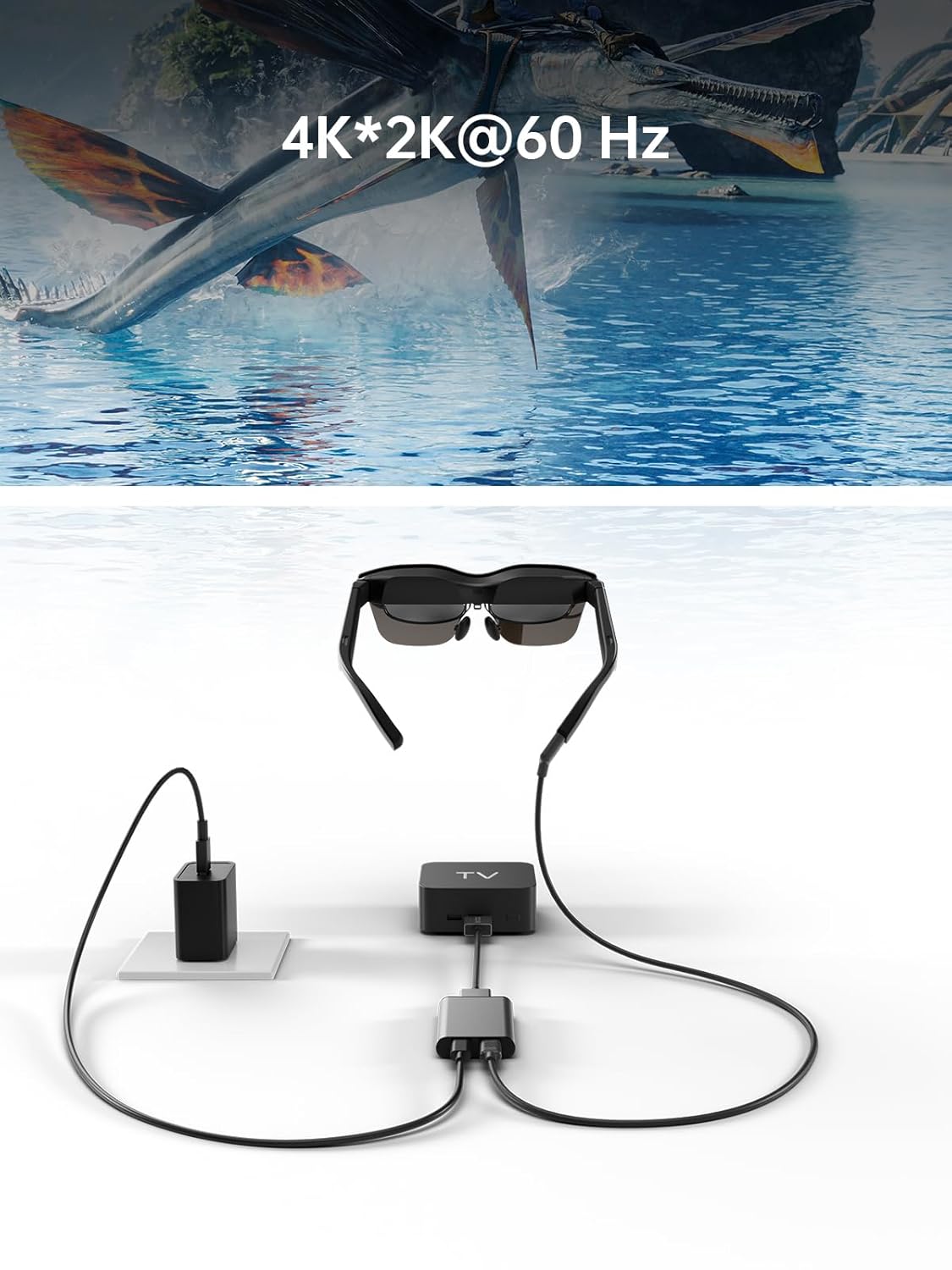
Image: Adapter facilitating 4K*2K@60Hz video output from a TV box to AR glasses.
6. Kev sib haum xeeb
The RayNeo HDMI-C to AR Glasses Charging Adapter is designed for broad compatibility. Ensure your devices meet the following criteria:
6.1. Source Devices (HDMI-IN)
Compatible with any device that outputs video via HDMI, including but not limited to:
- Gaming Consoles (e.g., PlayStation 5/4, Xbox Series X/S, Nintendo Switch, Steam Deck, ROG Ally, Legion Go)
- Personal Computers (PC)
- Laptops
- Streaming Devices (e.g., Apple TV)
6.2. AR Glasses (USB-C OUT)
Compatible with AR glasses that accept video input via USB-C, such as:
- RayNeo Air 2s
- RayNeo Air 2
- TCL NXTWEAR S
Nco tseg: Your source device must adhere to the USB-C standard protocol for charging and data transmission to function correctly with this adapter.

Image: Visual representation of the adapter's wide compatibility with various input devices and AR glasses.
7. Kev daws teeb meem
Yog tias koj ntsib teeb meem, thov saib cov kev daws teeb meem hauv qab no:
- No Display on AR Glasses:
- Ensure all cables (HDMI, USB-C to AR glasses) are securely connected.
- Xyuas kom tseeb tias koj lub cuab yeej qhov chaw tau qhib thiab tso tawm cov yeeb yaj kiab.
- Check if your AR glasses are powered on and functioning correctly.
- Test with different HDMI or USB-C cables if available.
- Source Device Not Charging:
- Confirm the power adapter is connected to the adapter's charging port and to a working power outlet.
- Ensure the power adapter provides sufficient wattage (txhawb nqa txog li 50W).
- Verify that your source device supports charging via its USB-C port when connected to an external adapter.
- Low Resolution or Poor Image Quality:
- Check the resolution settings on your source device.
- Ensure your HDMI and USB-C cables are high-quality and support the desired resolution.
- The maximum resolution is dependent on both the source device and the AR glasses.
- Adapter Tsis lees paub:
- Disconnect and reconnect all cables.
- Restart koj qhov chaw ntaus ntawv.
8. Kev tu
To ensure the longevity and optimal performance of your adapter, follow these maintenance guidelines:
- Ntxuav: Use a soft, dry cloth to clean the adapter. Avoid liquid cleaners or abrasive materials.
- Cia: Khaws lub adapter rau hauv qhov chaw txias, qhuav kom deb ntawm tshav ntuj ncaj qha thiab qhov kub thiab txias.
- Kev tuav: Tsis txhob ua kom lub adapter poob lossis raug kev cuam tshuam loj heev. Tsis txhob sim rhuav lub cuab yeej.
- Cable Care: Do not bend cables excessively or pull them forcefully from the ports.
9. Cov lus qhia tshwj xeeb
| Feature | Specification |
|---|---|
| Qauv nab npawb | HC 2.0 |
| Hom | RayNeo |
| Hom Connector | USB Type C (Output), HDMI (Input) |
| Kev them nyiaj yug | DC 5V / USB Type C |
| Max Power Delivery | Txog li 50 W |
| Max Resolution Support | 8K |
| Khoom siv | Aluminium Alloy |
| Xim | Nyiaj |
| Yam Nyhav | 2.89 hli |
| Pob Dimensions | 5.39 x 2.64 x 0.94 po |

Image: Dimensional drawing of the adapter.
10. Warranty thiab Support
For warranty information and customer support, please refer to the documentation included with your product or visit the official RayNeo webqhov chaw. Khaws koj daim ntawv txais yuav khoom rau kev lees paub.