
1. Taw qhia
The BOYA V35 is a compact and easy-to-use 2.4GHz wireless microphone system designed for capturing clear, high-quality audio. It is ideal for content creators, journalists, and anyone needing a reliable wireless audio solution for cameras and camcorders with a 3.5mm input. This manual provides detailed instructions for setting up, operating, and maintaining your BOYA V35 system.
2. Dab tsi hauv lub thawv
Thov xyuas lub pob ntawv kom paub meej tias txhua yam khoom muaj nyob:
- BY-V35 Transmitter (TX) x 2
- BY-V35 RX Receiver x 1
- BY-V35 Foam Windscreen x 2
- USB-C to USB-A Charging Cable x 1
- 3.5 hli TRS rau TRS Suab Cable x 1
- Charge Case x 1
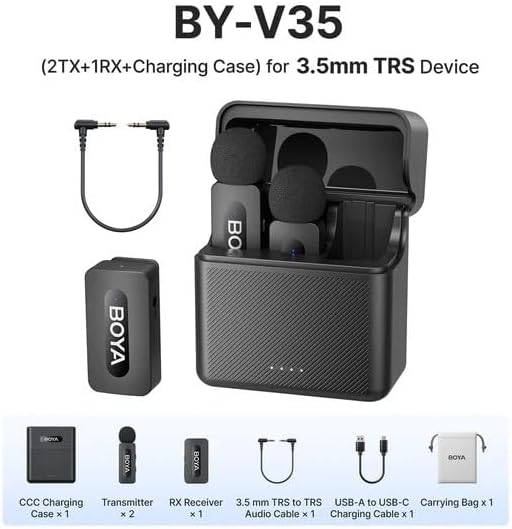
Daim duab 2.1: Diagram showing all components included in the BOYA V35 package, including two transmitters, one receiver, a charging case, foam windscreens, and cables.
3. Khoom Tshajview
3.1. Transmitter (TX)

Daim duab 3.1: Pem hauv ntej view of the BY-V35 Transmitter with the foam windscreen attached, showing the BOYA logo and indicator light.

Daim duab 3.2: Sab view of the BY-V35 Transmitter, illustrating the integrated clip for attachment to clothing and the foam windscreen.
The transmitter is a compact unit with an integrated microphone and clip. It features a power button, a status indicator light, and a USB-C charging port. The omnidirectional microphone is designed to capture sound from all directions.
3.2. Txais (RX)

Daim duab 3.3: Sab view of the BY-V35 Receiver, showing the USB-C port, power button, and 3.5mm output jack.
The receiver connects to your recording device (camera, camcorder). It includes a 3.5mm TRS output jack, a power button, a status indicator light, and a USB-C charging port. The receiver is designed for easy connection and stable signal reception.
3.3. Kev Them Nuj Nqis
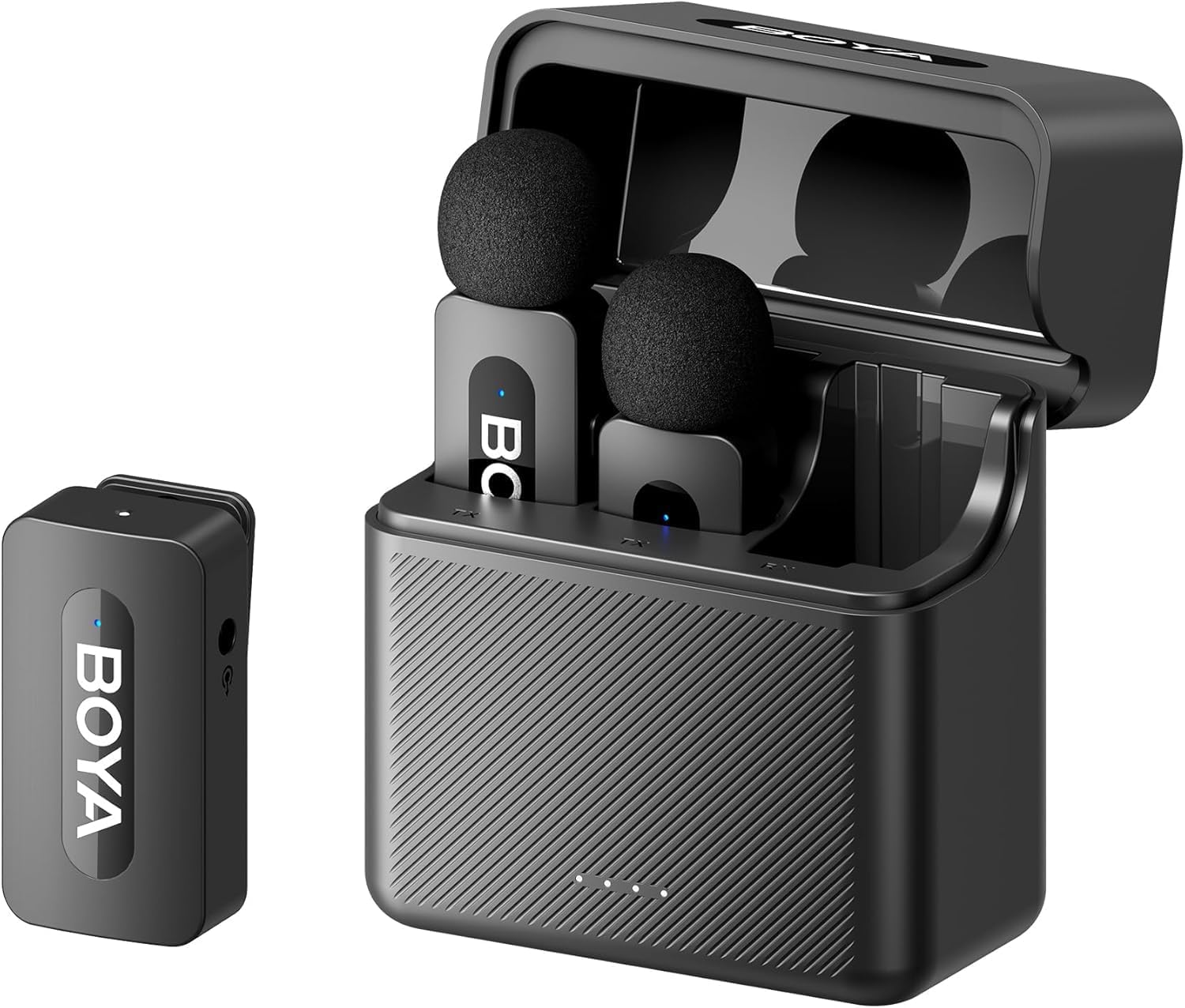
Daim duab 3.4: The complete BOYA V35 system, including the charging case, two transmitters, and one receiver, ready for storage or charging.
The charging case provides convenient storage and charging for both transmitters and the receiver. It has its own USB-C charging port and LED indicators to show the charging status of the case and the devices inside.
4. Teeb Qhia
4.1. Them cov khoom siv
- Place the transmitters and receiver into the charging case.
- Connect the USB-C to USB-A charging cable to the charging case and a USB power adapter (not included).
- The LED indicators on the charging case will show the charging status. The device indicators will also light up during charging.
- Ensure all devices are fully charged before first use for optimal battery life.
4.2. Fais fab rau thiab Pairing
- Press and hold the power button on both the transmitter(s) and the receiver for a few seconds until the indicator lights turn on.
- The devices will automatically attempt to pair. A solid blue light on both the transmitter and receiver indicates a successful connection. A blinking light indicates searching for a connection.
4.3. Connecting to a Recording Device
- Connect one end of the 3.5mm TRS to TRS audio cable to the 3.5mm output jack on the BY-V35 receiver.
- Connect the other end of the 3.5mm TRS to TRS audio cable to the microphone input jack on your camera or camcorder.
- Ensure your recording device's audio input is set to external microphone if applicable.
4.4. Txuas lub Transmitter
- Attach the foam windscreen to the transmitter's microphone to reduce wind noise and plosives.
- Use the integrated clip on the back of the transmitter to securely attach it to the speaker's clothing, ideally about 6-8 inches (15-20 cm) from the mouth.
5. Cov lus qhia ua haujlwm
5.1. Fais fab / Off
To power on or off the transmitter or receiver, press and hold the power button for approximately 3 seconds. The indicator light will illuminate or turn off accordingly.
5.2. Kev kaw suab
- Ensure the transmitter(s) and receiver are powered on and successfully paired (solid blue indicator light).
- Start recording on your connected camera or camcorder.
- Monitor the audio levels on your recording device to ensure proper sound capture.
5.3. Status Indicator Lights
- Xiav Xiav: Device is powered on and successfully paired.
- Blinking Blue: Device is powered on and searching for a connection.
- Khoom liab: Tsawg roj teeb.
- Blinking Red (while charging): Kev them nyiaj tab tom ua.
- Solid Green (while charging): Them tag nrho.
6. Kev tu
6.1. Kev ntxuav
- Siv daim ntaub mos mos thiab qhuav los so cov khoom siv.
- Tsis txhob siv cov tshuaj hnyav los yog cov tshuaj txhuam hniav.
- Ensure the foam windscreens are clean and free of debris. Replace if damaged.
6.2. Cia
- Store the BOYA V35 system in its charging case when not in use to protect it from dust and damage.
- Khaws rau hauv qhov chaw txias, qhuav, kom deb ntawm tshav ntuj ncaj qha thiab kub heev.
6.3. Kev kho roj teeb
- Charge the devices regularly, even if not used frequently, to maintain battery health.
- Tsis txhob tso lub roj teeb kom tag rau lub sijhawm ntev.
7. Kev daws teeb meem
| Teeb meem | Ua Tau | Kev daws |
|---|---|---|
| Tsis muaj suab los yog ntim tsawg | Devices not powered on; Not paired; Incorrect cable connection; Recording device volume too low. | Ensure TX and RX are on and paired. Check 3.5mm cable connection. Increase recording device's input volume. |
| Poor sound quality (static, dropouts) | Interference; Out of range; Low battery; Damaged windscreen. | Move closer to the receiver. Charge devices. Replace windscreen. Avoid strong electromagnetic fields. |
| Devices tsis ua ke | Devices too far apart; Interference; One device not powered on. | Ensure TX and RX are close to each other. Power cycle both devices. Check battery levels. |
| Charging case not charging devices | Charging case battery empty; Poor contact; Faulty cable. | Charge the charging case. Ensure devices are correctly seated. Try a different USB-C cable. |
8. Cov lus qhia tshwj xeeb
| Feature | Paub meej |
|---|---|
| Hom | BOYA |
| Qauv nab npawb | IB-V35 |
| Connectivity Technology | Wireless 2.4 GHz |
| Hom Connector | 3.5 mm Jack |
| Polar Qauv | Omnidirectional |
| Ntau zaus | 20Hz-16kHz |
| Teeb liab-rau-suab tsis piv | 80dB ua |
| Hwj chim Source | Roj teeb Powered |
| Yam Nyhav | 0.2 Kilograms (approximate, for entire kit) |
| Yam khoom Dimensions | 6.1 x 2.2 x 3.4 inches (approximate, for entire kit) |
| Compatible Devices | Lub Koob Yees Duab, Lub Koob Yees Duab |
9. Warranty thiab Support
Yog xav paub ntxiv txog kev lav phib xaub thiab kev txhawb nqa kev siv tshuab, thov mus saib BOYA lub vev xaib. weblossis tiv tauj koj tus neeg muag khoom hauv zos. Khaws koj daim ntawv pov thawj ntawm kev yuav khoom rau txhua qhov kev thov lav.