
1. Taw qhia
This manual provides detailed instructions for the installation, operation, and maintenance of your INQMEGA ST-598-6M-20X-WIFI-1021 Wireless Outdoor Solar Security Camera. Please read this manual thoroughly before using the product to ensure proper functionality and safety.
2. Khoom Tshajview
Cov yam ntxwv tseem ceeb:
- Kev sib txuas: 2.4G WiFi support (5G WiFi not supported). WiFi range up to 15 meters.
- Resolution & Night Vision: 6MP HD video with three night vision modes (infrared, full color, intelligent). Effective night vision distance up to 300 feet (approx. 91 meters).
- Optical Zoom & View: 20X optical zoom for clear close-ups. Dual screens offer 355° horizontal (pan) and 90° vertical (tilt) rotation, controllable via the application.
- Motion Detection: Supports PIR human detection wake-up (Max 12M). The camera sends object movement information to your phone.
- Lub zog Source: Solar powered with a 6W solar board and a built-in 12000mAh battery.
- Cia: Supports Amazon Cloud storage and TF Card (MAX 128GB, not included).
- Suab: Features 2-Way Audio.
- Durability: IP66 International Protection Rating, waterproof metal material.
Cov ntsiab lus pob:
- INQMEGA Wireless Outdoor Solar Security Camera (SOLAR CAMERA)
3. Teeb tsa
3.1 Txhim Kho Lub Koob Yees Duab
The camera is designed for outdoor wall mounting. Choose a location with optimal sunlight exposure for the solar panel and a clear view of the area you wish to monitor. Ensure the mounting surface is sturdy enough to support the camera's weight.
- Mark the drilling points on the wall using the camera's mounting bracket as a template.
- Laum qhov ntawm qhov chaw cim.
- Ntxig phab ntsa anchors yog tias tsim nyog.
- Ruaj ntseg lub mounting bracket rau phab ntsa siv cov screws muab.
- Muab lub koob yees duab txuas rau ntawm lub bracket, xyuas kom meej tias nws nyob ruaj khov.
3.2 Fais fab tuag
The camera is solar-powered and includes a built-in 12000mAh battery. Ensure the solar panel is exposed to direct sunlight for optimal charging. The camera will automatically power on once sufficient charge is detected or if it has been charged via USB (if applicable, refer to product packaging for USB charging details).
3.3 Txuas rau Wi-nkaus
This camera supports 2.4G WiFi networks only. It does not support 5G WiFi. The WiFi range is approximately 15 meters.
- Download the UBOX application on your smartphone (available for iOS and Android).
- Sau npe tus account thiab nkag mus.
- Ua raws li cov lus qhia hauv app kom ntxiv koj lub koob yees duab. Qhov no feem ntau yuav tsum tau luam theej duab QR code ntawm lub koob yees duab lossis sau nws tus ID.
- Connect the camera to your 2.4G WiFi network by entering your network credentials in the app.
- Once connected, the camera status indicator will confirm successful pairing.
4. Ua haujlwm lub koob yees duab
4.1 Multi-Angle View thiab Tswj
The camera features a wide-angle lens that can be manually adjusted up to 350 degrees. Additionally, the PTZ (Pan-Tilt-Zoom) lens allows for remote control of its rotation via the UBOX application.
- Lub Lens Dav Dav: Manual adjustment up to 350°.
- PTZ Zoom Lens: Control horizontal rotation (Pan) up to 355° and vertical rotation (Tilt) up to 90° using the application.
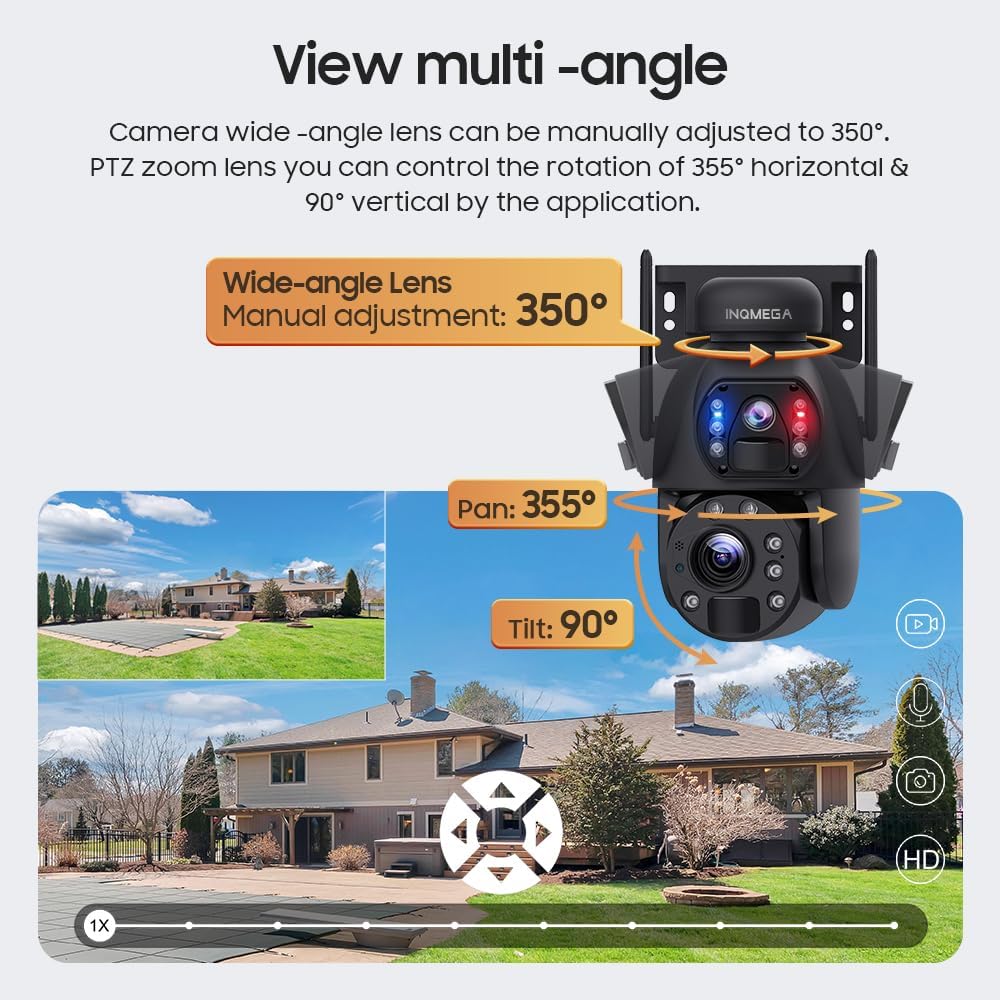
Image: Illustration of the camera's multi-angle viewing capabilities, including manual wide-angle adjustment and app-controlled pan/tilt for the PTZ lens.
4.2 Hom Pom Kev Hmo Ntuj
The camera offers three night vision modes to suit different monitoring needs:
- Infrared Night Vision: Provides clear black and white images in low light conditions.
- Xim Pom Kev Hmo Ntuj Tag Nrho: Utilizes built-in white lights to provide color images at night.
- Intelligent Night Vision: Automatically switches between infrared and full-color modes based on detected motion or specific settings.
4.3 Kev Tshawb Pom Kev Txav Mus Los thiab Kev Kaw Cov Ntaub Ntawv
The camera supports PIR (Passive Infrared) human detection. When motion is detected, the camera will wake up, record video, take photos, and send notifications to your mobile phone via the UBOX app.
- Recording Policy: To conserve battery life, the camera does not support continuous video recording. It records only when motion is detected.
- Taug qab: The camera does not support automatic tracking of moving objects. The camera angle can only be adjusted manually or through the app.
4.4 Ob-Way Audio
Utilize the two-way audio feature through the UBOX app to communicate with individuals near the camera. This allows for real-time conversation.
5. Kev tu
5.1 Cleaning the Solar Panel
Regularly clean the solar panel to ensure optimal charging efficiency. Dust, dirt, and debris can reduce the panel's ability to absorb sunlight. Use a soft, damp daim ntaub kom maj mam so qhov chaw.
5.2 General Camera Care
- Keep the camera lenses clean for clear image quality. Use a lens cleaning cloth if necessary.
- Ensure all cables and connections are secure and free from damage.
- Periodically check the mounting for stability, especially after strong winds or adverse weather conditions.
6. Kev daws teeb meem
6.1 Lub Koob Yees Duab Tsis Tso Tawm
- Xyuas kom lub hnub ci vaj huam sib luag tau txais lub hnub ci txaus.
- Check if the built-in battery has sufficient charge. Allow several hours of direct sunlight for initial charging.
6.2 Wi-Fi Kev Txuas Teeb Meem
- Verify that your router is broadcasting a 2.4G WiFi signal. The camera does not support 5G WiFi.
- Ensure the camera is within the 15-meter WiFi range of your router.
- Rov pib dua koj lub router thiab lub koob yees duab.
- Double-check your WiFi password in the UBOX app.
6.3 Duab Tsis Zoo
- Clean the camera lenses with a soft cloth.
- Xyuas kom tseeb tias tsis muaj dab tsi thaiv hauv lub koob yees duab lub tshav pob ntawm view.
- Check your internet connection speed, as a slow connection can affect streaming quality.
6.4 Kev Tshawb Pom Kev Txav Mus Los Tsis Ua Haujlwm
- Verify that motion detection is enabled in the UBOX app settings.
- Adjust the sensitivity settings for PIR detection in the app.
- Ensure there are no physical obstructions blocking the PIR sensor.
7. Cov lus qhia tshwj xeeb
| Feature | Paub meej |
|---|---|
| Qauv nab npawb | ST-598-6M-20X-WIFI-1021 |
| Kev siv sab hauv / sab nraum zoov | Sab nraum zoov |
| Connectivity Technology | Wireless (2.4G WIFI) |
| Hwj chim Source | Solar Powered |
| Video Capture daws teeb meem | 6 MP |
| Optical Zoom | 20x ib |
| Hmo Zeem Muag Ntau | Up to 200 Feet (approx. 61 meters) |
| Pan / Tilt Rotation | Lub kaum sab xis: 355 °, qaij: 90 ° |
| Wide-angle Lens Adjustment | Manual 350° |
| Roj teeb | 12000mAh (built-in), 6 Lithium Ion batteries included |
| Roj teeb lub zog | 9.36 Watt Sijhawm |
| Cia | Amazon Cloud & TF Card (Max 128GB, not included) |
| Khoom siv | Hlau |
| Dej Resistance Level | Kev ntsuas dej (IP66) |
| Tswj Txoj Kev | App (UBOX) |
| Yam Nyhav | 0.16 ooj (kwv yees 4.5 grams) |
8. Warranty Information
INQMEGA products are designed for reliability and performance. For specific warranty terms and conditions, please refer to the warranty card included with your product or contact INQMEGA customer support. Keep your purchase receipt as proof of purchase for warranty claims.
9. Cov neeg siv khoom txhawb nqa
If you encounter any issues or have questions regarding your INQMEGA Wireless Outdoor Solar Security Camera, please contact our customer support team. Refer to the product packaging or the INQMEGA official website rau cov ncauj lus kom ntxaws.