
KEENSTAR ST-265TC
KEENSTAR ST-265TC Touch Screen 2-Slice Toaster
Model: ST-265TC
1. Kev tiv thaiv tseem ceeb
Thaum siv cov khoom siv hluav taws xob, kev ceev faj txog kev nyab xeeb yuav tsum tau ua raws li cov hauv qab no:
- Nyeem tag nrho cov lus qhia ua ntej ua haujlwm lub toaster.
- Tsis txhob kov qhov chaw kub. Siv tes los yog pob qhov rooj.
- Txhawm rau tiv thaiv cov hluav taws xob poob siab, tsis txhob muab cov hlua khi, ntsaws, lossis ci hauv dej lossis lwm yam kua.
- Kev saib xyuas kaw yog tsim nyog thaum twg cov cuab yeej siv los ntawm lossis nyob ze cov menyuam yaus.
- Tshem tawm ntawm qhov hluav taws xob thaum tsis siv thiab ua ntej ntxuav. Cia kom txias ua ntej muab tso rau lossis tshem tawm cov khoom.
- Tsis txhob khiav ib qho khoom siv nrog ib qho kev puas tsuaj los yog ntsaws, lossis tom qab lub tshuab ua haujlwm tsis zoo lossis raug puas tsuaj rau txhua yam.
- Tsis txhob cia cov hlua khi rau ntawm ntug ntawm lub rooj lossis lub txee, lossis kov qhov chaw kub.
- Tsis txhob tso rau ntawm lossis ze ntawm lub qhov cub kub lossis hluav taws xob, lossis hauv qhov cub kub.
- Tsis txhob siv lub toaster rau lwm yam tshaj li kev siv.
- Oversize foods, metal foil packages, or utensils must not be inserted into a toaster as they may involve a risk of fire or electric shock.
- Qhov hluav taws kub tuaj yeem tshwm sim yog tias cov toasters npog lossis kov cov khoom siv hluav taws xob, nrog rau cov ntaub, cov ntaub, cov phab ntsa, thiab lwm yam, thaum ua haujlwm.
- Tsis txhob sim tshem cov zaub mov thaum lub toaster ntsaws rau hauv.
- Cov khoom siv no yog siv rau tsev neeg nkaus xwb.
2. Khoom Tshajview
The KEENSTAR ST-265TC is a modern 2-slice toaster featuring a touch screen interface for precise control over your toasting preferences. It includes wide slots to accommodate various bread types and a removable crumb tray for easy cleaning.
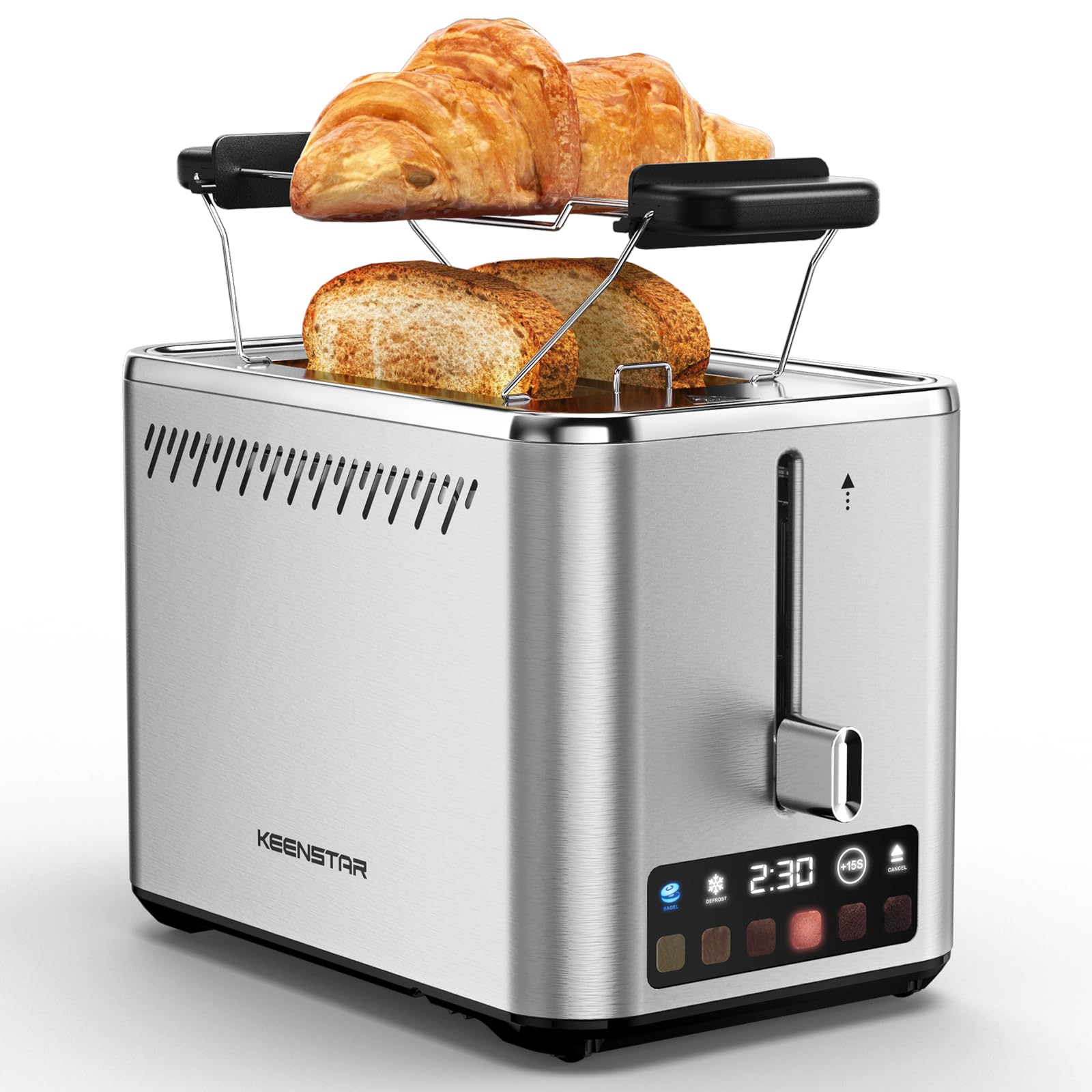
Image: KEENSTAR ST-265TC 2-Slice Toaster in silver stainless steel.
3. Teeb tsa
Unpacking
Carefully remove the toaster and all packaging materials from the box. Ensure all accessories, including the warming rack, are present.
Qhov chaw
Muab lub khob cij tso rau ntawm qhov chaw ruaj khov, tiaj tus, tiv taus tshav kub, kom deb ntawm cov khoom siv hluav taws xob xws li cov ntaub los yog cov phab ntsa. Xyuas kom muaj cua txaus nyob ib ncig ntawm lub cuab yeej.
Thawj Siv
Before toasting food for the first time, operate the toaster without bread on the highest browning setting (level 6) to burn off any manufacturing residues. A slight odor or smoke may be present; this is normal and will dissipate.
4. Cov lus qhia ua haujlwm
Tswj Vaj Huam Sib Luag Tshajview

Image: The toaster's smart touch control display showing 6 browning levels and extra functions like Bagel, Defrost, +15S, and Cancel.
Basic Toasting
- Insert up to two slices of bread into the wide 1.5-inch slots.
- Select your desired browning level (1-6) by touching the corresponding icon on the display. Level 1 is the lightest, and Level 6 is the darkest.
- Press the lever down until it locks into place. The digital display will show a countdown timer.
- The toast will automatically pop up when the cycle is complete.

Image: Visual guide showing the steps for easy toaster operation: 1. Put bread in slots, 2. Select browning level and function, 3. Press the lever down, 4. Enjoy delicious bread.
Bagel Muaj nuj nqi
This function is designed to toast the cut side of bagels while gently warming the outer side.
- Insert bagel halves into the slots with the cut side facing outwards.
- Xaiv qhov koj xav tau browning qib.
- Kov lub BAGEL button on the display. It will illuminate.
- Press the lever down until it locks.

Image: The toaster's display showing the illuminated BAGEL mode. BAGEL mode toasts one side only; place the cut side facing outward.
Defrost Muaj nuj nqi
Use this function to toast frozen bread without pre-thawing.
- Insert frozen bread into the slots.
- Xaiv qhov koj xav tau browning qib.
- Kov lub TXHAIS LUS button on the display. It will illuminate.
- Press the lever down until it locks.

Image: The toaster's display showing the illuminated DEFROST mode. This mode allows you to cook frozen breads easily without guesswork.
+15S Function
If your toast is not quite browned enough after a cycle, you can add an additional 15 seconds of toasting time.
- After a toasting cycle, if more browning is desired, touch the +15S khawm.
- The toaster will initiate a 15-second toasting cycle.
Ncua tseg muaj nuj nqi
To stop the toasting cycle at any time, simply touch the CANCEL button. The lever will automatically raise, and the heating elements will turn off.

Image: The toaster's display highlighting the +15S button to increase baking time by 15 seconds, and the Cancel button to stop heating.
Ua Kom Sov Rack
The included warming rack can be used to warm pastries, croissants, or other items that cannot be placed directly into the toaster slots.
- Place the warming rack securely on top of the toaster, aligning it over the slots.
- Place the item to be warmed on the rack.
- Start a toasting cycle (without bread in the slots) to generate heat. The heat rising from the toaster will warm the item on the rack.
- Monitor the item closely to prevent over-warming or burning.

Image: The removable warming rack attached to the toaster, with a croissant placed on it for warming.
Product Videos
Video: Demonstrates the touchscreen and warming tray features of the KEENSTAR toaster.
Video: Ib qho kev piav qhia ntxaws ntxawsview of the KEENSTAR Smart 2-Slice Toaster, highlighting its touch screen and various functions.
Video: Explores the key features and functionalities of the KEENSTAR toaster.
5. Kev tu thiab tu
Kev tu huv
Always unplug the toaster from the power outlet and allow it to cool completely before cleaning. Wipe the exterior with a soft, damp cloth. Do not use abrasive cleaners or metal scouring pads, as these can scratch the stainless steel finish.
Quaj Cawv
The removable crumb tray collects crumbs during toasting and should be emptied regularly to prevent fire hazards.
- Xyuas kom lub toaster yog unplugged thiab txias tag.
- Tshem tawm cov khoom khib nyiab uas nyob hauv qab ntawm lub toaster.
- Tshem cov crumbs thiab so lub tais huv si nrog adamp daim ntaub.
- Xaub lub tais rov qab rau hauv qhov chaw kom txog thaum nws nias ruaj ntseg.

Image: The toaster's convenient design showing the removable crumb tray being pulled out and the cord storage area on the bottom.
Cord Cia
For neat storage, the power cord can be wrapped around the designated area on the underside of the toaster.
6. Kev daws teeb meem
- Toaster not turning on: Ensure the power cord is securely plugged into a working electrical outlet. Make sure the toast lever is fully pressed down.
- Uneven toasting: Ensure bread slices are centered in the slots. Try adjusting the browning level. Different types of bread may require different settings.
- Bread stuck in slots: Unplug the toaster immediately and allow it to cool. Gently remove the bread using non-metallic tongs. Never use metal utensils.
- Smoke coming from toaster: Unplug the toaster immediately. Remove any food particles or crumbs that may be lodged inside the slots or on the heating elements. Ensure the crumb tray is clean.
7. Cov lus qhia tshwj xeeb
| Hom | KEENSTAR |
| Qauv | ST-265TC |
| Hwj chim | 900 watt |
| Voltage | 120V (AC) |
| Cov Naj Npawb | 2 |
| Khoom siv | Stainless hlau |
| Khoom Dimensions (D x W x H) | 10.39 "x 7.1" x 6.1" |
| Qhov dav dav | 1.5cm ua |
| Tshwj xeeb nta | Cancel Function, LED Indicator, Removable Crumb Tray, Touchscreen, Warming Rack |

Image: Diagram showing the dimensions of the KEENSTAR ST-265TC toaster: 9.4 inches (24cm) length, 6.1 inches (15.6cm) width, 7 inches (18cm) height, and 1.5 inch (3.8cm) wide slots.
8. Warranty thiab Support
Warranty
This KEENSTAR toaster comes with a 2-year warranty. Please refer to the warranty card included in the product packaging for detailed terms and conditions.
Kev Pab Txhawb Cov Neeg Siv Khoom
For any questions, technical assistance, or warranty claims, please contact KEENSTAR customer support. Contact information can typically be found on the warranty card or the official KEENSTAR webqhov chaw.
Ask a question about this manual
Ask about setup, troubleshooting, compatibility, parts, safety, or missing instructions. Manuals+ will review the question and use this page’s manual context to help answer it.