
1. Taw qhia
This manual provides detailed instructions for the installation, operation, and maintenance of the TMEZON MZ-VDP-NE160 4-wire doorbell camera. This outdoor station is designed to work seamlessly with compatible TMEZON videophone monitors, such as the MZ-IP-V728TW, to provide secure and convenient visitor management for your property.
2. Cov ntaub ntawv kev nyab xeeb
Please read and understand all safety instructions before installing or operating this device. Failure to follow these instructions may result in electric shock, fire, or damage to the product.
- Kev Nyab Xeeb Hluav Taws Xob: Installation should be performed by a qualified electrician or technician. Ensure power is disconnected before any wiring work.
- Kev Tiv Thaiv Dej: While designed for outdoor use, avoid direct high-pressure water jets. Ensure all connections are properly sealed.
- Kub: Do not expose the device to extreme temperatures outside its operating range.
- Ntxuav: Siv ib daim ntaub mos, qhuav los ntxuav. Tsis txhob siv cov tshuaj abrasive los yog cov kuab tshuaj.
3. Cov ntsiab lus ntawm pob
Xyuas kom tseeb tias tag nrho cov khoom muaj nyob hauv pob:
- 1 x TMEZON MZ-VDP-NE160 Doorbell Camera Unit
- Mounting Screws thiab Phab Ntsa Plugs
- Cov kab txuas txuas
- Tus Neeg Siv Los Siv (cov ntawv no)
4. Khoom Tshajview
The TMEZON MZ-VDP-NE160 is an outdoor doorbell camera unit. It features a camera for video surveillance, a microphone for audio input, a speaker for audio output, and a call button to initiate communication with the indoor monitor.
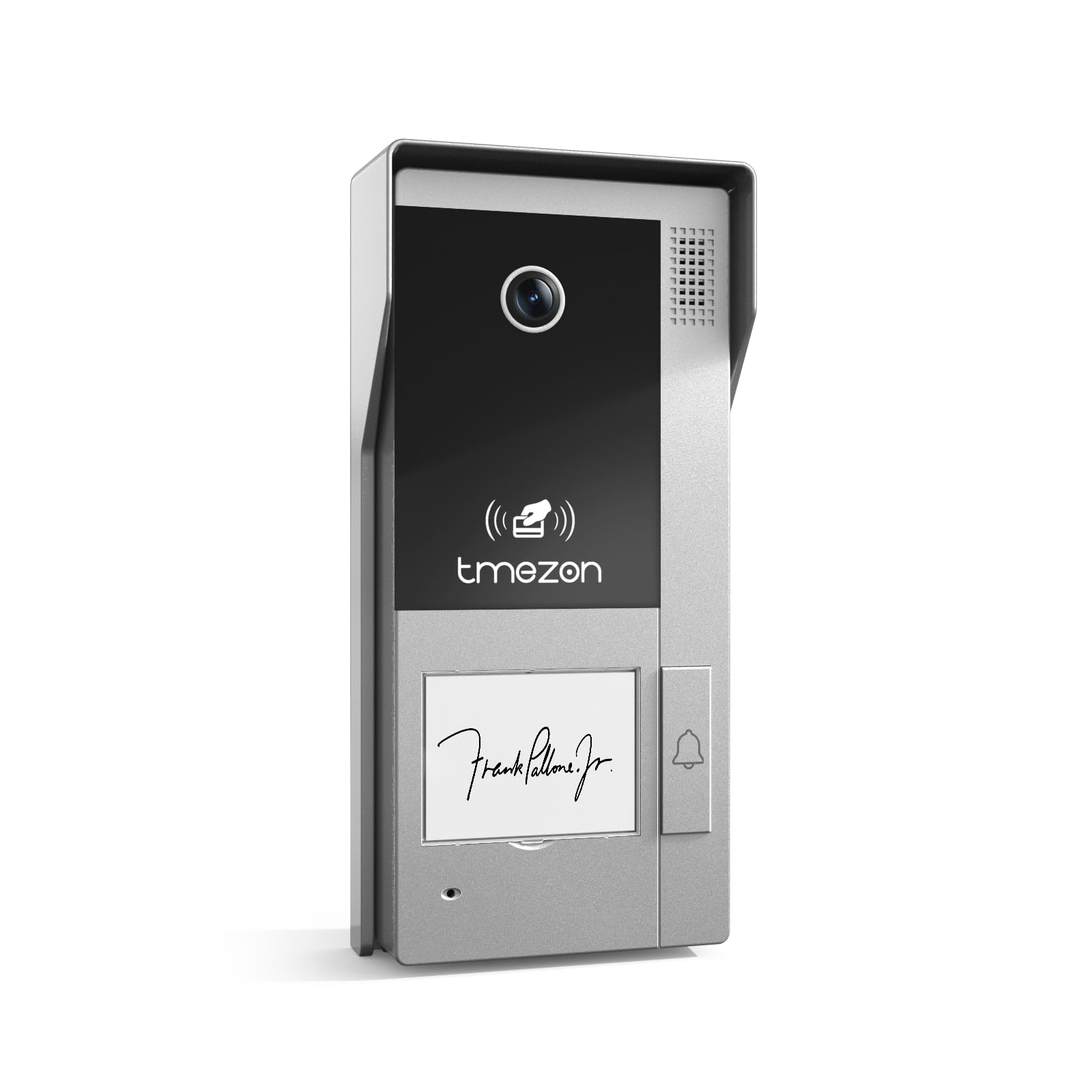
Daim duab 1: Pem hauv ntej view of the TMEZON MZ-VDP-NE160 doorbell camera, showing the camera lens, call button, microphone, and speaker grille.
Cov khoom tseem ceeb muaj xws li:
- Lub koob yees duab Lens: Captures video pub.
- Hu khawm: Activates the indoor monitor and initiates communication.
- Microphone: Kaw cov suab los ntawm cov neeg tuaj saib.
- Hais lus: Allows two-way audio communication.
- Wiring Terminal (Rear): For connecting the 4-wire cable to the indoor monitor and power supply.
5. Kev teeb tsa thiab kev teeb tsa
The MZ-VDP-NE160 is a 4-wire system. Proper wiring is crucial for correct operation. It is recommended to consult a professional for installation if you are unfamiliar with electrical wiring.
5.1 Chaw Nruab Nruab Nruab Nruab
- Choose a location near your entrance, typically at a height of 1.4 to 1.6 meters (4.6 to 5.2 feet) from the ground, ensuring a clear view ntawm cov qhua.
- Avoid direct sunlight or strong light sources that could cause glare on the camera.
- Xyuas kom tseeb tias qhov chaw mounting tiaj tus thiab ruaj khov.
5.2 Wiring Diagram (General)
The doorbell camera connects to the indoor monitor (e.g., MZ-IP-V728TW) using a 4-wire cable. The typical connections are:
- Hlau 1: Suab
- Hlau 2: Video
- Hlau 3: Hauv av (GND)
- Hlau 4: Lub hwj chim (DC 12V)
Note: Refer to the specific wiring diagram provided with your indoor monitor for precise connection details. Ensure polarity is correct for power connections.
5.3 Cov kauj ruam installation
- Disconnect hwj chim: Before starting, ensure all power to the existing doorbell system and the indoor monitor is turned off at the circuit breaker.
- Mounting Bracket: Secure the mounting bracket (if applicable, or the unit directly) to the wall using the provided screws and wall plugs.
- Hlau kev twb kev txuas: Connect the 4-wire cable from the indoor monitor to the corresponding terminals on the rear of the MZ-VDP-NE160 doorbell camera. Ensure connections are secure.
- Kev ruaj ntseg Unit: Attach the doorbell camera unit to the mounting bracket or directly to the wall, ensuring it is firmly in place.
- Rov Qab Fais Fab: Once all connections are made and secured, restore power to the system.
- Test System: Test the doorbell functionality by pressing the call button and verifying communication with the indoor monitor.
6. Cov lus qhia ua haujlwm
The TMEZON MZ-VDP-NE160 doorbell camera operates in conjunction with your TMEZON indoor monitor.
- Visitor Call: When a visitor presses the call button on the MZ-VDP-NE160, the indoor monitor will ring and display the video feed from the doorbell camera.
- Kev sib txuas lus ob-txoj kev: On the indoor monitor, you can answer the call to engage in two-way audio communication with the visitor.
- Door Release (if connected): If an electronic door lock is connected to your indoor monitor system, you can typically unlock the door from the indoor monitor during a call.
- Saib xyuas: Some indoor monitors allow you to manually view the live video feed from the doorbell camera at any time, even without a visitor pressing the button.
7. Kev tu
Regular maintenance helps ensure the longevity and optimal performance of your doorbell camera.
- Ntxuav: Periodically wipe the camera lens and the front panel with a soft, slightly damp daim ntaub tshem tawm cov plua plav thiab av. Tsis txhob siv cov tshuaj hnyav lossis cov khoom siv abrasive.
- Tshawb xyuas kev sib txuas: Annually, inspect the wiring connections for any signs of corrosion or loosening. Ensure the unit is securely mounted.
- Software hloov tshiab: While this specific unit does not have user-updatable software, ensure your indoor monitor's firmware is up to date for best compatibility and features.
8. Kev daws teeb meem
If you encounter issues with your MZ-VDP-NE160 doorbell camera, refer to the following common problems and solutions:
| Teeb meem | Ua Tau | Kev daws |
|---|---|---|
| No video/audio on indoor monitor |
|
|
| Khawm hu xov tooj tsis teb |
|
|
| Tsis zoo video |
|
|
If the problem persists after attempting these solutions, please contact TMEZON customer support.
9. Cov lus qhia tshwj xeeb
| Feature | Paub meej |
|---|---|
| Qauv | MZ-VDP-NE160 |
| Hom | TMEZON |
| Khoom Dimensions (L x W x H) | 1 x 1 x 1 cm |
| Hom Xov Tooj | 4-Wire System |
| Kev Ua Haujlwm Voltage | 240 Volts (System dependent, typically 12V DC for the unit itself, 240V might refer to power supply input) |
| Kev siv fais fab | 5 Watts |
| Xim | Grey |
| Cov Cheebtsam suav nrog | Doorbell unit |
10. Warranty thiab Support
For warranty information and technical support, please refer to the documentation provided with your complete TMEZON videophone system or visit the official TMEZON webqhov chaw. Khaws koj daim ntawv yuav khoom ua pov thawj ntawm kev yuav khoom rau kev lees paub.
For direct assistance, you may contact TMEZON customer service through their official channels.