
1. Taw qhia
The ChunHee Solar Outdoor Motion Sensor Alarm is designed to deter unwanted animals and intruders from your property using a combination of motion-activated strobe lights and loud sounds, including dog barking and gunshot effects. This device is solar-powered, environmentally friendly, and suitable for various outdoor environments.

Image 1.1: The Solar Outdoor Motion Sensor Alarm in an outdoor setting, illustrating its detection capabilities for animals like deer, bears, raccoons, and coyotes within a 110-degree angle and 33ft distance.
2. Khoom Tshajview
Familiarize yourself with the main components of your Solar Outdoor Motion Sensor Alarm:
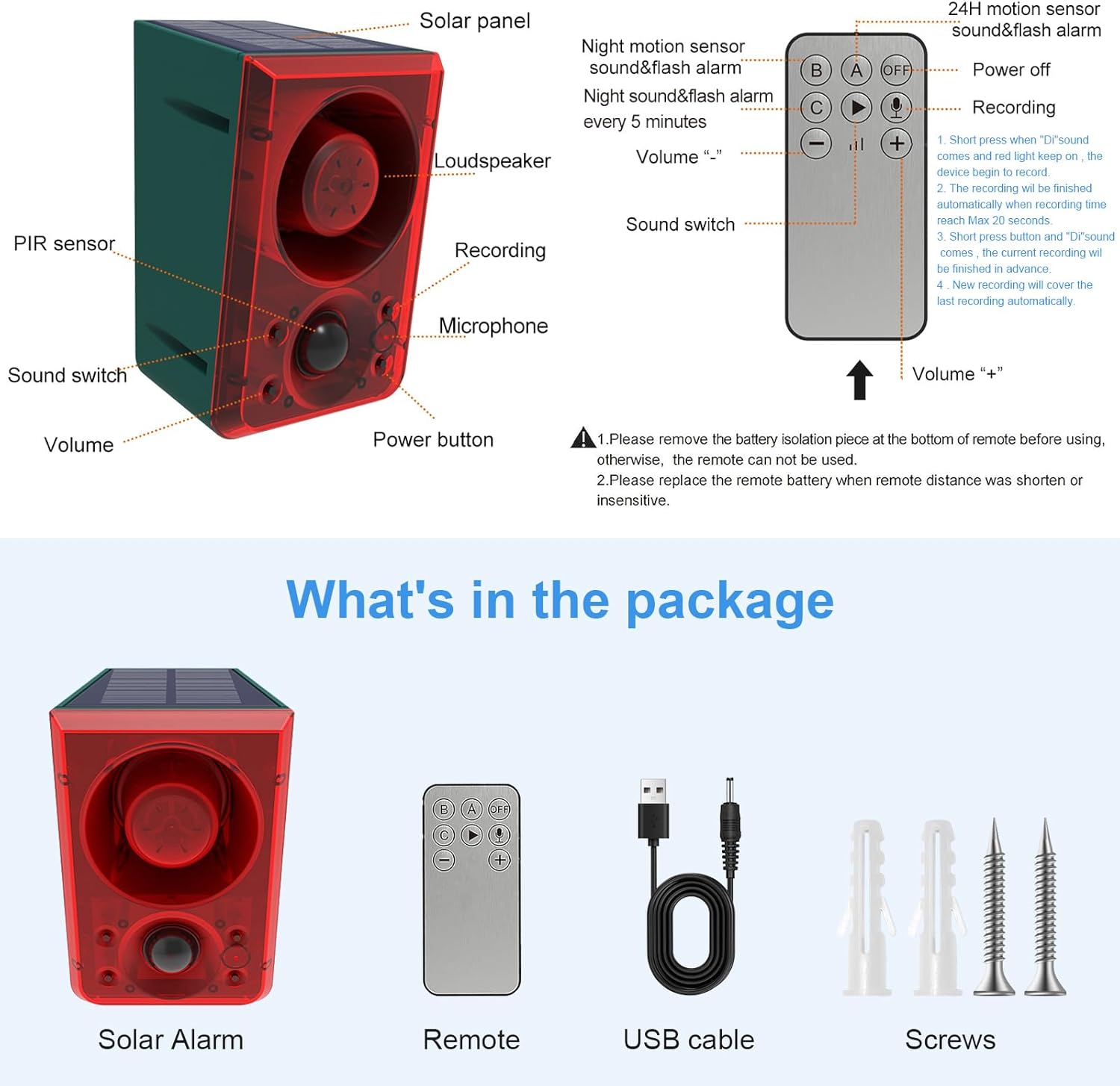
Image 2.1: Labeled diagram showing the solar panel, loudspeaker, PIR sensor, sound switch, volume control, power button, recording button, microphone, DC charge port, and mounting port.
- Hnub Ci Vaj Huam Sib Luag: Converts sunlight into electrical energy to charge the internal battery.
- Tus Poj Laib Siab: Emits alarm sounds.
- PIR Sensor: Passive Infrared sensor detects motion within its range.
- Suab mus: Toggles between different sound options.
- Volume Control: Adjusts the alarm volume.
- Lub zog khawm: Turns the device on/off and cycles through modes.
- Cov khawm kaw: Initiates custom sound recording.
- Microphone: Captures custom sound recordings.
- DC Charge Port: Rau lwm txoj kev them nyiaj ntawm USB cable.
- Mounting Port: Rau kev teeb tsa ruaj ntseg.
3. Nta
- Motion Detection: PIR sensor detects movement within 5-8 meters and a 110-degree angle.
- Lub tswb nrov: Produces a 130dB alarm sound to deter intruders and animals.
- Strobe Teeb: Flashing lights accompany the alarm sound for visual deterrence.
- Suab Options: Includes default dog barking and gunshot sounds.
- Custom Recording: Allows users to record their own alarm sounds (up to 20 seconds).
- Adjustable Volume: Three levels of volume adjustment.
- Solar Powered: Equipped with a high-capacity solar panel for continuous operation.
- Weatherproof: IP65 waterproof design ensures durability in various weather conditions.
- Multiple Work Modes: Three distinct operating modes for different needs.

Image 3.1: The alarm's ability to support DIY recording and produce a 129dB sound, shown deterring an intruder while residents sleep peacefully.
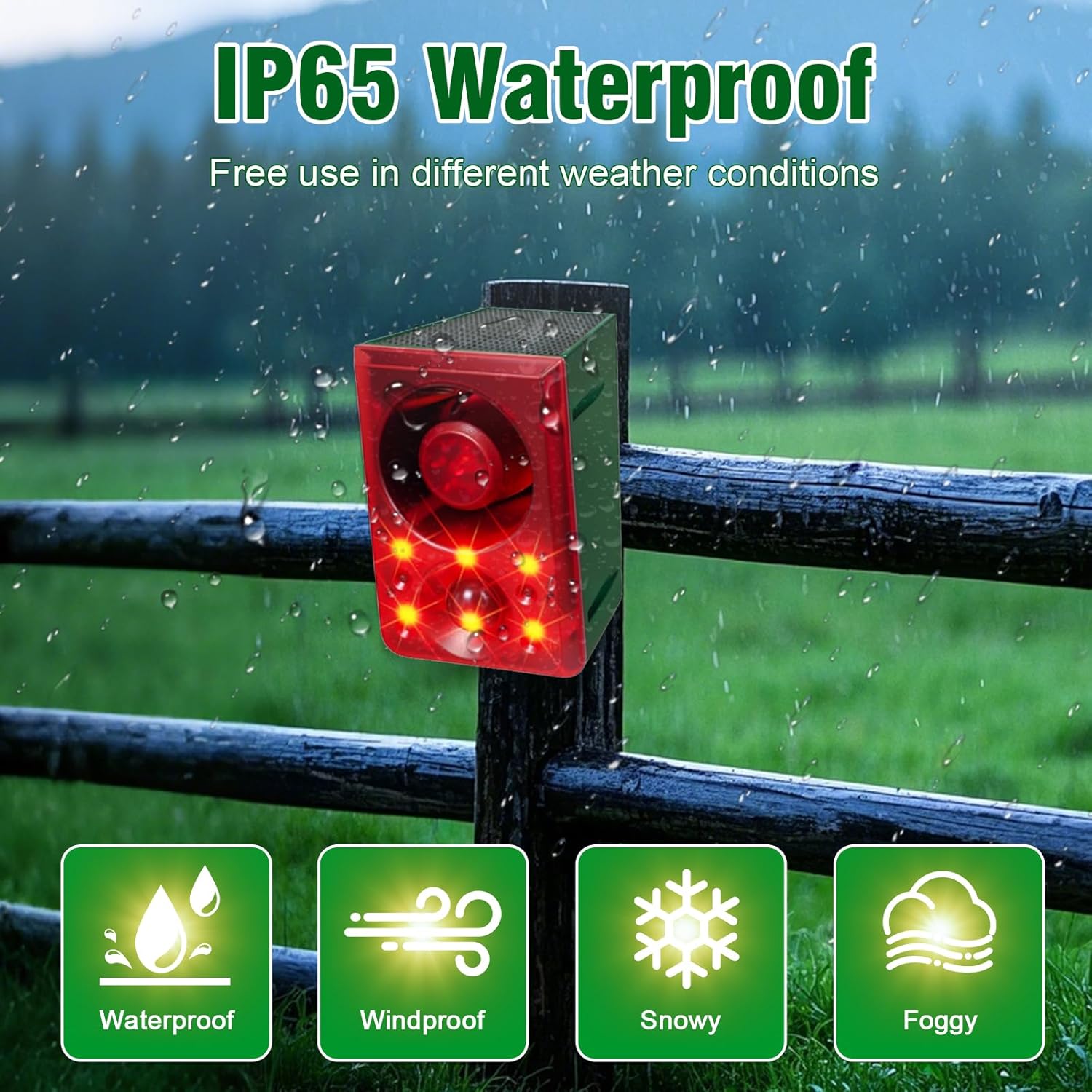
Image 3.2: The alarm mounted on a fence during rain, highlighting its IP65 waterproof, windproof, snowy, and foggy weather resistance.
4. Teeb tsa
- Thawj zaug nqi: Before first use, ensure the solar alarm charges under direct sunlight for at least 1 full day (24 hours). This activates the battery and ensures optimal performance.
- Kev tswj chaw taws teeb tswj: Remove the battery isolation piece from the bottom of the remote control before use.
5. Hom kev ua haujlwm
The alarm offers three operating modes, selectable via the power button on the device or the remote control:

Image 5.1: Visual representation of the three operating modes: Mode A (24-hour flash and alarm), Mode B (Night 12-hour flash and alarm), and Mode C (Night 12-hour flash and alarm every 5 minutes).
- Mode A (24-hour Flash and Alarm): When motion is detected, the alarm will sound and flash for 24 hours a day.
- Mode B (Night 12-hour Flash and Alarm): When motion is detected, the alarm will sound and flash only during nighttime hours.
- Mode C (Night 12-hour Flash and Alarm Every 5 Minutes): During nighttime, if motion is detected, the alarm will sound and flash every 5 minutes.
Press the power button once to activate Mode A, twice for Mode B, three times for Mode C, and four times to power off the device.
6. Kev Sau Npe
The alarm allows you to record a custom sound for personalized deterrence:
- Initiate Recording: Long press the recording button for 2 seconds. The indicator light will stay on, signaling that recording has begun.
- Sau Cov Suab: Speak clearly into the microphone. The device can record up to 20 seconds.
- Xaus Sau: Release the button to finish recording. The recording will automatically end after 20 seconds if the button is not released.
- Sau dua: A new recording will automatically overwrite the previous one.
The recording distance affects the playback effect. Ensure you are close enough to the microphone for clear audio capture.
7. Kev them nyiaj yug
Your ChunHee Solar Outdoor Motion Sensor Alarm supports two charging methods:

Image 7.1: Illustration of the solar panel charging under sunlight and the DC charge port for USB charging.
- Kev them nyiaj hnub ci: The integrated solar panel charges the internal battery using sunlight. For optimal charging, ensure the device is placed where it receives at least 4 hours of direct sunlight daily. Charging efficiency may vary with weather conditions and seasons.
- DC them nyiaj: For faster charging or during periods of low sunlight, use the provided USB cable with a DC 5V ≤ 1A charger. DC charging typically takes less than 2 hours.
8. Installation & Placement
Proper installation and placement are crucial for the alarm's effectiveness:
- Sunlight Exposure: Mount the alarm in a location that receives ample direct sunlight throughout the day to maximize solar charging.
- Qhov chaw kuaj pom: Position the alarm to face the direction of animal activity or potential entry points. The PIR sensor has a 110-degree sensing angle and detects movement within 5-8 meters.
- Mounting: Use the provided installation kit (screws) to securely hang the alarm.
- Kev siv ntau yam: The alarm is suitable for various outdoor locations, including farms, coops, barns, camping sites, homes, gardens, and yards.

Image 8.1: Examples of extensive use scenarios, including a garden, orchard, camping area, and courtyard, demonstrating the alarm's adaptability.
9. Kev tu
- Solar Vaj Huam Sib Luag: Tsis tu ncua so lub hnub ci vaj huam sib luag nrog cov mos mos, damp cloth to remove dust and debris, ensuring efficient charging.
- Roj teeb tej thaj chaw deb: If the remote control's operating distance shortens or becomes insensitive, replace its battery.
- Kev saib xyuas raws caij nyoog: In regions with prolonged cloudy or rainy weather, consider bringing the alarm indoors for manual DC charging to maintain battery levels.
10. Kev daws teeb meem
| Qhov teeb meem | Ua Tau | Kev daws |
|---|---|---|
| Alarm tsis qhib | Insufficient charge; PIR sensor obstructed; device off or in incorrect mode. | Ensure initial 24-hour charge. Verify solar panel receives direct sunlight. Check for obstructions in front of the PIR sensor. Confirm device is powered on and in the desired operating mode. |
| Kev tswj chaw taws teeb tsis ua haujlwm | Battery isolation piece not removed; low remote battery; out of range. | Remove the battery isolation piece. Replace the remote battery if needed. Ensure you are within a few feet of the alarm for remote operation. |
| Animals not deterred immediately | Animals may need time to adapt to the deterrent. | It may take between two and four weeks for some animals to respond to the deterrent. Maintain consistent operation. |
| Kev tshawb nrhiav tsis sib haum | Low battery charge; environmental factors. | Ensure the device is fully charged. Optimal range is achieved with a full battery. Avoid placing near heat sources or objects that might interfere with PIR detection. |
11. Cov lus qhia tshwj xeeb
| Feature | Paub meej |
|---|---|
| Hom | ChunHee |
| Hwj chim Source | Solar Powered |
| Khoom Dimensions | 5" L x 3" W x 5" H |
| Tswj Txoj Kev | Chaw taws teeb, Kov |
| Suab nrov | 129 Decibels |
| Mounting Hom | Phab ntsa Mount |
| Maximum Range (PIR) | 8m (kwv yees 26 feet) |
| Tshuab Technology | Passive Infrared (PIR) |
| Yam Nyhav | 2.02 kg ib |
| Waterproof Rating | IP65 |
12. Official Product Videos
Outdoor Motion Sensor Alarm Overview
Video 12.1: Daim video no muab kev piav qhia dav davview of the ChunHee Solar Outdoor Motion Sensor Alarm, demonstrating its features, working principle, and application in various outdoor settings to deter animals and intruders.
Barking Dog Alarm Demonstration
Video 12.2: A short demonstration of the barking dog alarm sound feature, showing how it activates upon motion detection to scare away potential threats.
13. Warranty & Kev Pab Txhawb
For any questions or further assistance regarding your ChunHee Solar Outdoor Motion Sensor Alarm, please refer to the included user manual or contact ChunHee customer support. Specific warranty details may be provided with your purchase documentation.