
Taw qhia
This manual provides detailed instructions for the installation, operation, and maintenance of your CAMECHO Qualcomm 8 Core Android 15 Autoradio. Please read this manual thoroughly before using the product to ensure proper function and safety. This unit is designed for Mercedes-Benz Vito 3 W447 models from 2014 to 2020.
Ntim Cov Ntsiab Lus
Xyuas kom tseeb tias txhua yam khoom teev hauv qab no suav nrog hauv koj pob:
- 1 × Android Car Radio Unit
- 2 × USB Cables
- 1 × Fais fab Cable
- 1 × RCA Cable
- 1 × GPS Antenna
- 1 × Rear View Lub koob yees duab Input Cable
- 1 × AHD Rear View Lub koob yees duab
Duab: Tshajview of the CAMECHO Autoradio unit, its dimensions, rear connection ports, and a complete list of included accessories for installation and functionality.
Kev sib haum xeeb
This autoradio is compatible with Mercedes-Benz Vito 3 W447 models manufactured between 2014 and 2020. If you are unsure about compatibility, please consult your vehicle's manual or contact customer support with a photo of your car's central console and the back of your original CD unit.

Image: Visual comparison of the Mercedes Benz Vito 3 W447 dashboard, illustrating the appearance before and after the CAMECHO Autoradio installation.
Cov yam ntxwv tseem ceeb
- Android 15 OS with Qualcomm 8-Core Processor: Provides a modern user interface, improved response speed, and powerful functions.
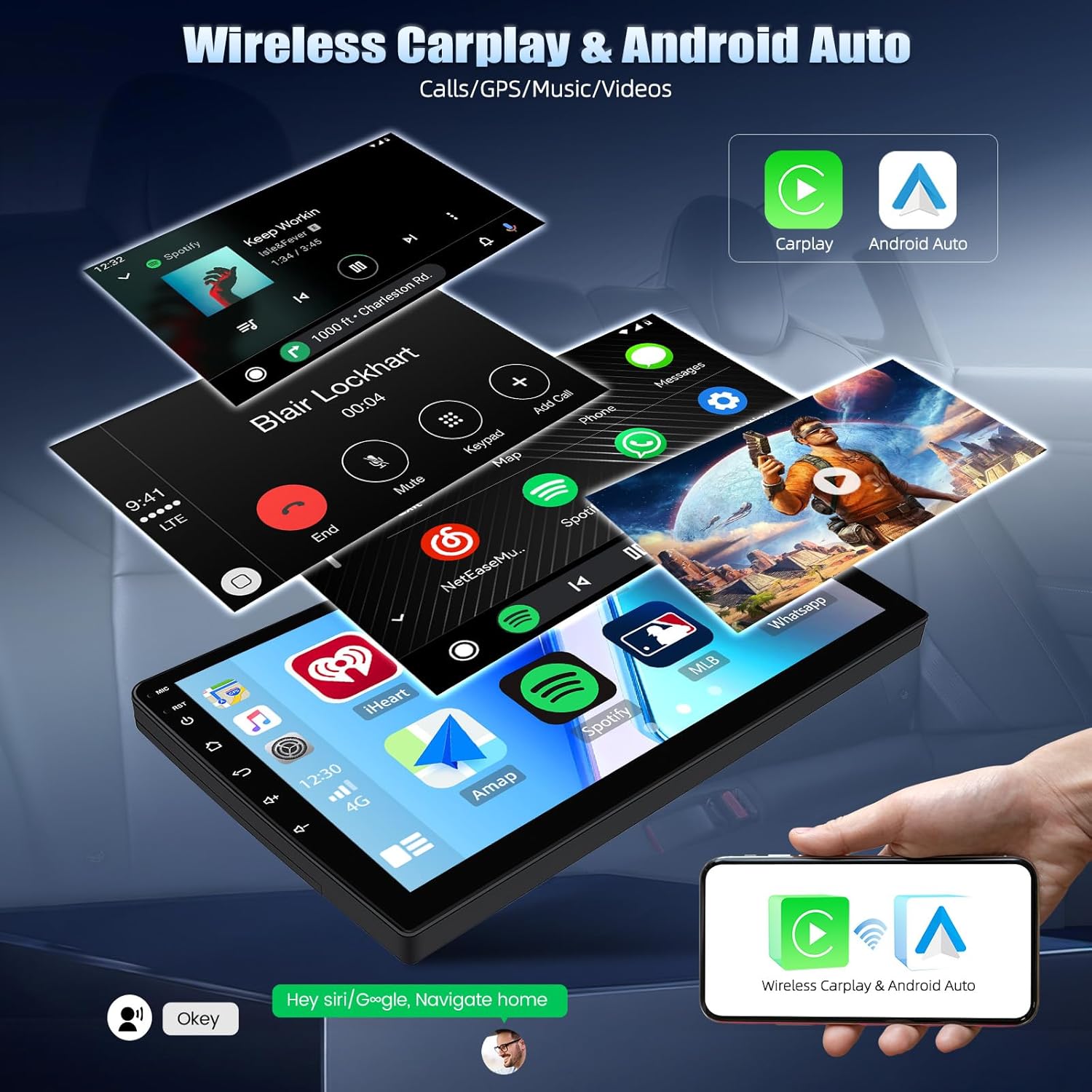
- Wireless CarPlay & Android Auto: Seamless smartphone integration for navigation, music, and calls via Bluetooth.
- Dual Wi-Fi (2.4 GHz & 5 GHz): Ensures stable and fast internet connectivity.
- Bluetooth 5.1: Cov Offers stable and fast wireless connection for clear audio and consistent signal.
- Integrated GPS: Supports real-time updates for accurate navigation.
- Hi-Res & Dolby Audio Support: Enhances sound immersion, clarity, and spatial layering for a rich auditory experience.
- 10-inch Touchscreen Display: Provides intuitive control and clear visuals.
- Qab View Kev Txhawb Yees: Includes a rear view lub koob yees duab rau kev pab nres tsheb.
- Steering Wheel Control: Compatible with vehicle steering wheel controls.

Image: Detailed infographic showcasing the core features and technical specifications of the CAMECHO Autoradio.
Kev teeb tsa thiab kev teeb tsa
Kev teeb tsa los ntawm cov kws tshaj lij yog qhov pom zoo. Xyuas kom lub tsheb lub zog raug txiav tawm ua ntej pib teeb tsa.
Cov kauj ruam installation:
- Carefully remove the original car radio and central console trim.
- Connect the provided power cable, RCA cable, and USB cables to the corresponding ports on the new autoradio unit.
- Install the GPS antenna in a location with clear sky visibility.
- Txuas lub nraub qaum view camera input cable and install the AHD rear view koob yees duab (yog muaj).
- Secure the autoradio unit in the dashboard opening.
- Rov txuas lub zog ntawm lub tsheb thiab sim txhua yam haujlwm.

Image: Connection diagram for reversing assist and steering wheel control features.
Cov lus qhia ua haujlwm
Kev ua haujlwm yooj yim:
- Fais fab / Off: Nias thiab tuav lub pob fais fab ntawm lub tshuab lossis siv lub tshuab hluav taws xob ntawm lub tsheb.
- Touchscreen Navigation: Use the 10-inch touchscreen to navigate through menus and applications.
- Volume Control: Adjust volume using the physical buttons or on-screen controls.
Wireless CarPlay & Android Auto:
- Ensure Bluetooth is enabled on your smartphone and the autoradio.
- Pair your smartphone with the autoradio via Bluetooth.
- Once connected, CarPlay or Android Auto will launch automatically, allowing access to navigation, music, and communication apps.

Image: Display of the CAMECHO Autoradio showcasing the wireless CarPlay and Android Auto interfaces with various applications.
GPS Navigation:
The integrated GPS system supports online and offline navigation. For offline maps, download the necessary data via Wi-Fi. The system provides real-time updates for accurate routing.

Image: GPS navigation and FM/RDS radio interfaces on the CAMECHO Autoradio.
FM/RDS Radio:
Access the FM/RDS radio function to listen to local stations. The RDS feature provides additional information such as station name and traffic announcements.

Image: FM/RDS radio interface with frequency display.
Multimedia Playback:
The unit supports various audio and video formats. Play media from USB devices or stream content via connected smartphone or Wi-Fi.
Video: Demonstration of the CAMECHO Android Carplay Radio with Incell Screen, showcasing its interface and features.
Kev tu
To ensure the longevity and optimal performance of your autoradio, follow these maintenance guidelines:
- Ntxuav: Siv ib daim ntaub mos, qhuav los ntxuav qhov screen thiab sab nrauv. Tsis txhob siv cov tshuaj abrasive los yog cov kuab tshuaj.
- Software hloov tshiab: Periodically check for software updates to ensure the system runs efficiently and has the latest features.
- Cooling System: The unit features a cooling fan. Ensure the fan vents are not obstructed to prevent overheating.

Image: Illustration of the cooling fan settings and internal cooling mechanism.
Kev daws teeb meem
If you encounter issues with your autoradio, refer to the following common problems and solutions:
| Teeb meem | Ua Tau | Kev daws |
|---|---|---|
| Unit tsis power on | Incorrect wiring; Blown fuse; Vehicle power issue | Check power connections; Inspect vehicle fuses; Consult a professional installer. |
| Tsis muaj suab | Volume tsawg dhau; Mute qhib; Qhov teeb meem ntawm kab lus hais lus | Nce ntim; Deactivate lub suab; Tshawb xyuas cov lus sib txuas. |
| GPS teeb liab ploj lossis tsis raug | GPS antenna obstructed or improperly installed | Xyuas kom GPS kav hlau txais xov muaj qhov tseeb view of the sky; Re-position antenna if necessary. |
| CarPlay/Android Auto tsis txuas | Bluetooth not enabled; Phone not paired; Software glitch | Enable Bluetooth on both devices; Re-pair phone; Restart both devices. |
Yog tias qhov teeb meem tshwm sim tom qab sim cov kev daws teeb meem no, thov hu rau cov neeg siv khoom txhawb nqa.

Duab: Tshajview of advanced features including Voice Assistance, DAB, OBD2, and Global Weather, some of which may require activation or additional modules.
Specifications
| Feature | Paub meej |
|---|---|
| Kev Ua Haujlwm | Hauv 15 |
| Processor | Qualcomm 8-Core |
| RAM | 4 GB ua |
| Internal Storage | 64 GB ua |
| Zaub Loj | 10cm ua |
| Zaub daws teeb meem | 1024*600 IPS Touchscreen |
| Kev sib txuas | Bluetooth 5.1, Dual WiFi (2.4GHz/5GHz), USB, Ethernet |
| Suab Tso Tawm Hom | Stereo, Mono |
| Surround Suab Channels | 4.0 |
| Tso zis zog | 50 Watts per channel (Total 200 Watts) |
| Video encoding | H.264, H.265/HEVC |
| Compatible Devices | Smartphone, Tablet, Speaker, Game Console, Personal Computer |
| Pob Dimensions | 47.7 x 34.9 x 11.5 cm |
| Qhov hnyav | 2.17, XNUMX kg |
Warranty thiab Support
This product comes with a warranty. For specific warranty details, please refer to the documentation included with your purchase or contact customer support. If you have any questions or require assistance, please do not hesitate to contact us via Amazon email. We are committed to ensuring your satisfaction and will respond as quickly as possible.
Image: Customer support information, including contact email.