
Strong SRT427
STRONG 4K UHD Box SRT 427 User Manual
Taw qhia
This manual provides comprehensive instructions for the installation, operation, and maintenance of your STRONG 4K UHD Box SRT 427. Please read this manual carefully before using the device to ensure proper functionality and to prevent damage. Keep this manual for future reference.
Ntim Cov Ntsiab Lus
Ua ntej txuas ntxiv mus nrog kev teeb tsa, thov xyuas kom meej tias txhua yam khoom muaj nyob hauv pob khoom:
- STRONG 4K UHD Box SRT 427
- Chaw taws teeb tswj ( roj teeb tsis suav nrog)
- Fais fab Adapter
- HDMI Cable
- Daim ntawv qhia kev txhim kho ceev
Teeb tsa
Follow these steps to set up your STRONG 4K UHD Box SRT 427:
- Txuas rau TV: Connect one end of the HDMI cable to the HDMI OUT port on the SRT 427 and the other end to an available HDMI IN port on your television.
- Txuas rau Fais Fab: Plug the power adapter into the DC IN port on the SRT 427, then plug the adapter into a wall outlet.
- Connect to Internet (Optional): For internet-based features, connect an Ethernet cable to the LAN port on the SRT 427, or configure Wi-Fi settings after initial boot-up.
- Ntxig roj teeb rau hauv tej thaj chaw deb: Open the battery compartment on the remote control and insert 2x AAA batteries (not included), ensuring correct polarity.
- Hwj chim On: Turn on your TV and select the correct HDMI input source. The SRT 427 should power on automatically. If not, press the power button on the remote control.
- Initial Setup Wizard: Follow the on-screen instructions to complete the initial setup, including language selection, network configuration, and channel scanning.
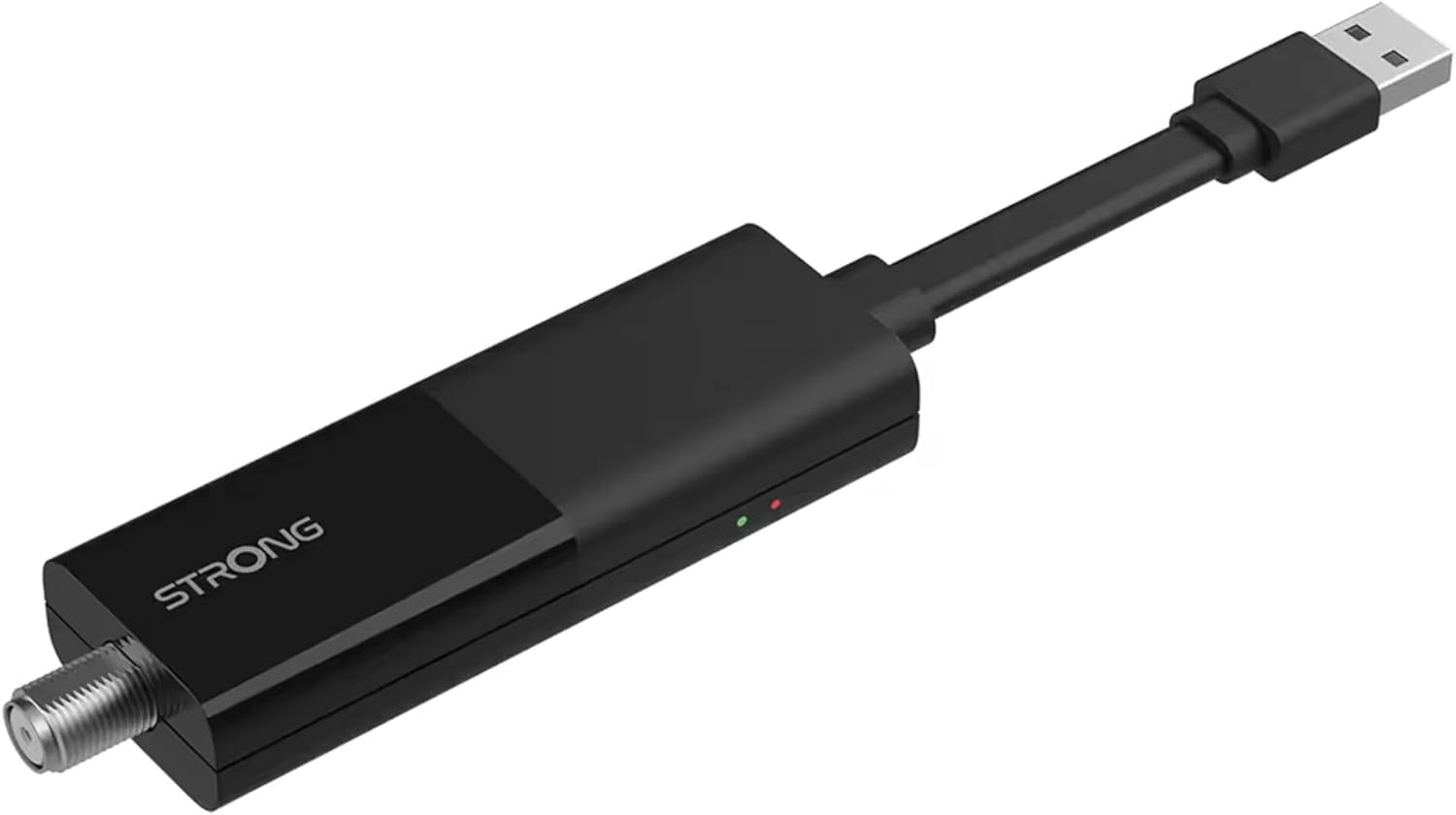
Image: The STRONG 4K UHD Box SRT 427, a compact black USB dongle-style device with a USB connector on one end and an F-type coaxial antenna input on the other, featuring the 'STRONG' logo and small indicator lights.
Cov lus qhia ua haujlwm
Once the initial setup is complete, you can begin using your SRT 427. Use the remote control to navigate the user interface.
- Tsev Screen: Nias lub TSEV button to access the main menu, where you can find applications, settings, and media options.
- Kev taw qhia: Siv tus xub yuam sij (UP, DOWN, LEFT, RAWS) to move through menus and options. Press OK kom paub meej tias kev xaiv.
- Volume Control: Siv cov VOL+ thiab VOL- buttons to adjust the audio volume.
- Kev xaiv Channel: If connected to an antenna, use the CH + thiab CH- buttons to change channels, or enter channel numbers directly using the numeric keypad.
- Kev teeb tsa: Access the settings menu to customize display, audio, network, and system preferences.
- Rov qab ua si: Connect a USB storage device to the USB port to play media files (photos, videos, music) through the built-in media player.
Kev tu
Proper maintenance ensures the longevity and optimal performance of your SRT 427.
- Ntxuav: Disconnect the device from power before cleaning. Use a soft, dry cloth to wipe the exterior. Do not use liquid cleaners or abrasive materials.
- Qhov cua: Ensure the device is placed in a well-ventilated area. Do not block ventilation openings.
- Kub: Tsis txhob tso lub cuab yeej rau qhov kub thiab txias, tshav ntuj ncaj qha, lossis cov av noo siab.
- Hloov tshiab Firmware: Periodically check for firmware updates through the system settings to ensure you have the latest features and bug fixes.
Kev daws teeb meem
If you encounter issues with your SRT 427, refer to the following common problems and solutions:
| Teeb meem | Kev daws |
|---|---|
| Tsis muaj zog | Check if the power adapter is securely connected to the device and the wall outlet. Ensure the outlet is functional. |
| Tsis muaj duab hauv TV | Verify the HDMI cable is correctly connected to both the SRT 427 and the TV. Ensure the TV is set to the correct HDMI input source. |
| Tsis muaj suab | Check the volume level on both the SRT 427 and your TV. Ensure audio settings in the SRT 427 menu are correct. |
| Kev tswj chaw taws teeb tsis ua haujlwm | Check and replace the batteries. Ensure there are no obstructions between the remote and the device's IR sensor. |
| Txuas tsis tau Wi-Fi | Ensure your Wi-Fi router is on and within range. Re-enter the Wi-Fi password in the network settings. Try restarting both the SRT 427 and your router. |
Specifications
Technical specifications for the STRONG 4K UHD Box SRT 427:
- Qauv nab npawb: SRT427
- Khoom Dimensions: 5.91 x 7.87 x 5.91 po
- Yam khoom hnyav: 1.76 puj
- Roj teeb: 1 AAAA batteries required (for remote control, typically)
- Chaw tsim tshuaj paus: Muaj zog
- Language (Default): Italian (may vary by region, user configurable)
- ASIN: B0FDPX7PRQ
- Hnub Ua Ntej Muaj: Lub Yim Hli 21, 2025
Warranty thiab Support
For warranty information and technical support, please refer to the warranty card included in your product packaging or visit the official Strong webqhov chaw. Tsis txhob sim kho lub cuab yeej koj tus kheej, vim qhov no yuav ua rau koj lub warranty tsis ua haujlwm.
Official Webqhov chaw: www.strong.tv
Ask a question about this manual
Ask about setup, troubleshooting, compatibility, parts, safety, or missing instructions. Manuals+ will review the question and use this page’s manual context to help answer it.