
boAt Rockerz Trinity Gen 2
boAt Rockerz Trinity Gen 2 Bluetooth Neckband Earphones User Manual
Model: Rockerz Trinity Gen 2
Taw qhia
Thank you for choosing the boAt Rockerz Trinity Gen 2 Bluetooth Neckband Earphones. This manual provides essential information for setting up, operating, and maintaining your earphones. Please read it carefully to ensure proper use and to maximize your listening experience. These earphones are designed for extended audio playback, high-resolution sound, and clear communication.
Dab tsi nyob hauv lub thawv
- boAt Rockerz Trinity Gen 2 Earphones
- Charge Cable
- Cov neeg siv phau ntawv
The package includes the boAt Rockerz Trinity Gen 2 Earphones, a charging cable, and this user manual.
Khoom Tshajview
The boAt Rockerz Trinity Gen 2 features a flexible neckband design with in-ear earbuds. It includes integrated controls for media playback, call management, and voice assistant activation. The neckband houses the battery and main electronics.
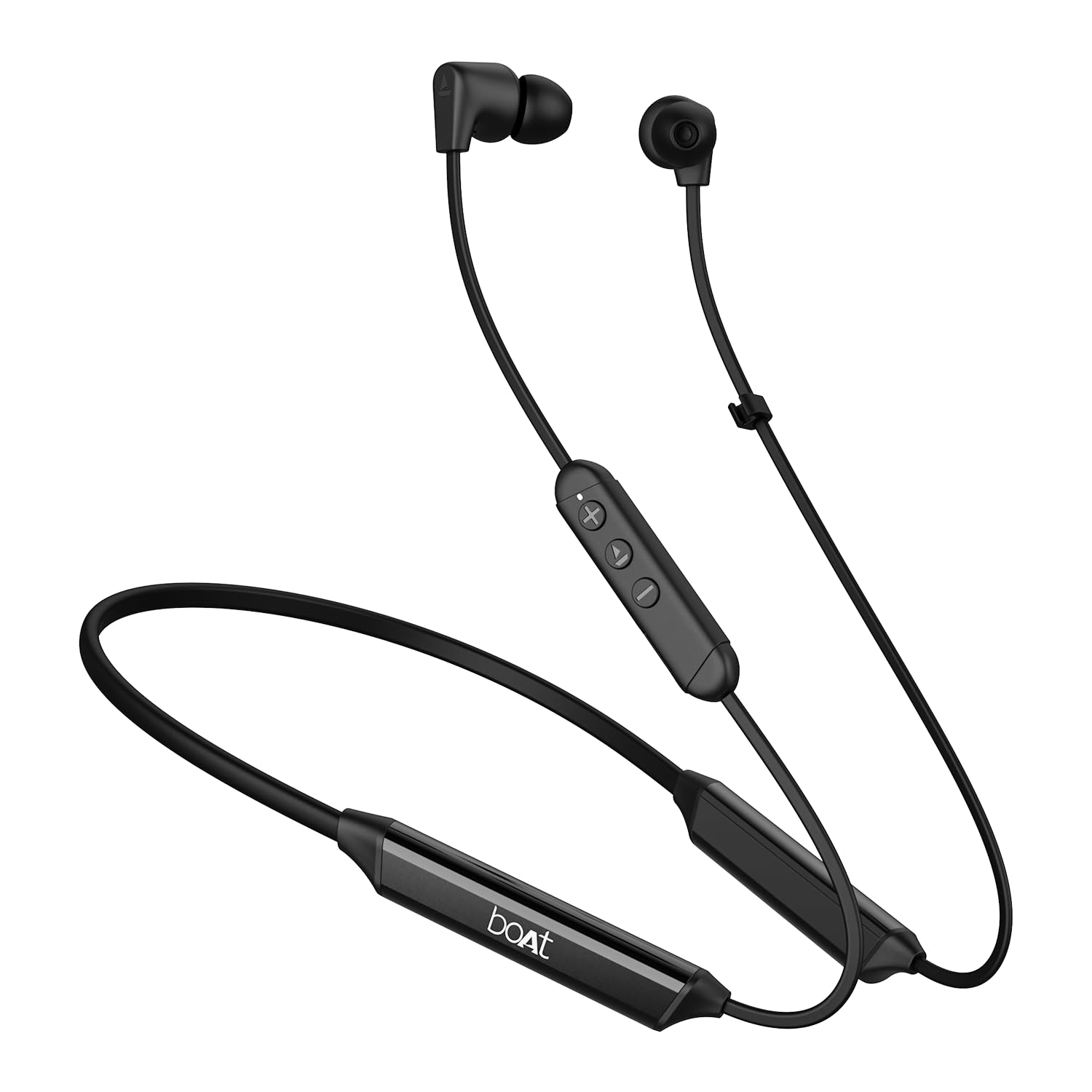
Image: The boAt Rockerz Trinity Gen 2 neckband earphones, highlighting the flexible neckband and in-ear design.

Duab: Ib qho ntxaws view of the boAt Rockerz Trinity Gen 2 earbuds and the inline control panel, showing buttons for volume and playback.
Teeb tsa
1. Them lub mloog pob ntseg
Before first use, fully charge your earphones. Connect the provided charging cable to the charging port on the neckband and to a USB power source. The LED indicator will show charging status. A full charge provides up to 150 hours of playback. With ASAP Charge, 10 minutes of charging provides up to 24 hours of playback.
Image: The boAt Rockerz Trinity Gen 2 neckband, illustrating its long battery life with "150 HOURS PLAYBACK" text.
2. Fais fab rau / tawm
- Txhawm rau Fais Fab: Press and hold the Multi-function button (usually the center button on the inline control) for approximately 3 seconds until the LED indicator flashes blue and you hear a power-on prompt.
- Mus Faib Tawm: Press and hold the Multi-function button for approximately 5 seconds until the LED indicator flashes red and you hear a power-off prompt.
3. Bluetooth khub
- Xyuas kom tseeb tias lub mloog pob ntseg raug tua.
- Press and hold the Multi-function button for about 5-7 seconds until the LED indicator flashes red and blue alternately, indicating pairing mode.
- On your device (smartphone, laptop), enable Bluetooth and search for available devices.
- Select "boAt Rockerz Trinity Gen 2" from the list of found devices.
- Once connected, the LED indicator will flash blue slowly, and you will hear a confirmation tone.

Image: The boAt Rockerz Trinity Gen 2 earphones connected to both a smartphone and a tablet, illustrating the dual pairing feature.
4. Dual Pairing (Multipoint)
The Rockerz Trinity Gen 2 supports dual pairing, allowing connection to two devices simultaneously. After pairing with the first device, disable Bluetooth on that device. Put the earphones back into pairing mode and connect to the second device. Once connected to the second device, re-enable Bluetooth on the first device. The earphones will automatically connect to both devices, allowing seamless switching between them for calls and media.
Cov lus qhia ua haujlwm
Cov Thawj Tswj
- Ua si / Pause: Nias lub Multi-function khawm ib zaug.
- Ntim Tuaj: Nias lub '+' khawm.
- Ntim Cia: Nias lub khawm '-'.
- Next Track: Nias thiab tuav lub pob '+'.
- Yav dhau los khiav: Nias thiab tuav lub pob '-'.
- Teb / Xaus Hu: Nias lub Multi-function khawm ib zaug.
- Tsis kam hu: Nias thiab tuav lub Multi-function khawm rau 2 vib nas this.
- Qhib lub suab pab: Ob npaug nias lub khawm Multi-function.
Suab Hi-Res nrog LDAC
The Rockerz Trinity Gen 2 supports Hi-Res Audio with LDAC codec, providing superior sound quality. Ensure your connected device also supports LDAC for the best audio experience. This feature allows for high-resolution audio transmission over Bluetooth, preserving more detail from your music.

Image: The boAt Rockerz Trinity Gen 2 earphones displaying the "Hi-Res Audio Wireless" and "LDAC" logos, indicating high-resolution audio support.
Dual EQ Hom
Switch between different equalizer modes to customize your audio experience. Refer to the product's quick start guide or experiment with button combinations (often a triple-press of the Multi-function button or a combination with volume buttons) to cycle through available EQ presets. This allows you to adjust the sound profile raws li koj nyiam.

Image: A close-up of the boAt Rockerz Trinity Gen 2 earbuds, highlighting the availability of dual EQ modes for sound customization.
AI-ENx™ Technology for Clear Calls
The earphones feature AI-ENx™ technology, which enhances call clarity by eliminating background noise. This ensures your voice is heard clearly during calls, even in noisy environments.

Image: A close-up of a boAt Rockerz Trinity Gen 2 earbud, emphasizing the AI-ENx™ technology for clear voice calls.
BEAST™ Mode (Low Latency)
Activate BEAST™ Mode for a low-latency gaming experience (65ms). This mode synchronizes audio with visuals, providing a more immersive gaming session. To activate/deactivate BEAST™ Mode, refer to the specific instructions in your quick start guide, usually involving a dedicated button press or a combination.

Image: The boAt Rockerz Trinity Gen 2 earphones with "BEAST™ MODE 65ms Low Latency" text, depicted alongside gaming characters to illustrate its use for gaming.
Kev tu
Ntxuav
- Wipe the earphones with a soft, dry, lint-free cloth.
- Tsis txhob siv cov tshuaj hnyav, ntxuav cov kuab tshuaj, lossis cov tshuaj detergents.
- Regularly clean the ear tips to prevent wax buildup, which can affect sound quality.
Dej tsis kam (IPX5)
The earphones are IPX5 rated, meaning they are resistant to sweat and light splashes of water. They are not designed for submersion in water. Avoid exposing them to heavy rain or direct water jets. Ensure the charging port cover is securely closed when not charging to maintain water resistance.

Image: The boAt Rockerz Trinity Gen 2 earbuds with water droplets on them, illustrating their IPX5 water resistance rating.
Cia
Store the earphones in a cool, dry place away from direct sunlight and extreme temperatures. Avoid storing them with sharp objects that could damage the cables or earbuds.
Kev daws teeb meem
Tsis muaj zog
- Xyuas kom lub pob ntseg tau them tag nrho.
- Press and hold the Multi-function button for 3-5 seconds to power on.
Ua tsis tau Pair nrog Device
- Ensure the earphones are in pairing mode (LED flashing red and blue alternately).
- Xyuas kom tseeb tias Bluetooth tau qhib rau ntawm koj lub cuab yeej thiab nws nyob hauv qhov ntau (feem ntau 10 meters).
- Forget "boAt Rockerz Trinity Gen 2" from your device's Bluetooth list and try pairing again.
- Restart both your device and the earphones.
Low or Distorted Sound
- Adjust the volume on both the earphones and your connected device.
- Ensure the ear tips are clean and properly seated in your ears.
- Sim sib txawv cov lus qhia pob ntseg kom zoo dua qub.
- Txav mus ze rau koj lub cuab yeej txuas nrog kom tsis txhob cuam tshuam.
Microphone tsis ua haujlwm
- Xyuas kom lub pob ntseg txuas nrog koj lub cuab yeej zoo.
- Check your device's audio settings to ensure the earphones are selected as the input device.
- Clean the microphone opening if it appears obstructed.
Specifications
| Hom | boAt |
| Qauv Lub Npe | Rockerz Trinity Gen 2 |
| Pob ntseg tso | Hauv pob ntseg |
| Form Factor | Hauv pob ntseg |
| Tsis Siv Neeg Tswj | AI-ENx™ Technology (for calls) |
| Connectivity Technology | Bluetooth |
| Roj Teeb Nruab Nrab Lub Neej | 150 teev |
| Lub sij hawm them roj teeb | 10 Minutes (for 24 hours playback via ASAP Charge) |
| Hom Tsav Tsheb | Dynamic Driver (10mm, inferred from description) |
| Ntau zaus | 20 Hz - 40,000 Hz |
| Dej tsis kam | IPX5 |
| Tshwj xeeb nta | Hi-Res Audio with LDAC, Dual EQ Modes, AI-ENx™ Technology, Dual Pairing, BEAST™ Mode (65ms Low Latency), ASAP Charge |
| Tswj Txoj Kev | Suab, Khawm |
| Yam Nyhav | 60 Nws |
Warranty thiab Support
Warranty Information
The boAt Rockerz Trinity Gen 2 earphones come with a 1 xyoo warranty from the date of purchase. This warranty covers manufacturing defects. Please retain your purchase receipt for warranty claims. The warranty does not cover damage caused by misuse, accidents, unauthorized modifications, or normal wear and tear.
Kev Pab Txhawb Cov Neeg Siv Khoom
For technical assistance, warranty claims, or any other inquiries, please contact boAt customer support:
- Email: info@imaginemarketingindia.com
- Chaw tsim tshuaj paus: Imagine Marketing Ltd
Please visit the official boAt weblub xaib kom tau txais cov ntaub ntawv txhawb nqa tshiab tshaj plaws thiab cov ntaub ntawv tiv tauj.
Ask a question about this manual
Ask about setup, troubleshooting, compatibility, parts, safety, or missing instructions. Manuals+ will review the question and use this page’s manual context to help answer it.