
1. Cov ntaub ntawv tseem ceeb ntawm kev nyab xeeb
WARNING: This product is not suitable for individuals with certain medical conditions or circumstances. Consult your doctor before use if you have any medical conditions.
- Do not use if you have an implanted defibrillator, cardiac pacemaker, or any other implanted metallic or electronic device.
- Do not use if you have heart rhythm problems, epilepsy, brain diseases, or neurological disorders.
- Do not use if you have undiagnosed chronic pain.
- Do not use if you are pregnant or in labor.
- Do not use if you have hypertension (high blood pressure) or thrombosis (blood clots).
- Tsis txhob siv yog tias koj muaj mob qog noj ntshav.
- Do not use if you are sensitive to electrotherapy.
- Do not use excessively.
- Do not use above the neck, especially on the head or neck area.
- Do not use if you are under 22 years of age.
Individual symptoms, situations, circumstances, and results may vary. The information provided is not intended for medical diagnosis or treatment or as a substitute for professional medical advice. Please consult your physician or a qualified healthcare provider regarding your condition and appropriate medical treatment.

Image: Visual representation of areas where the TENS unit should not be applied, emphasizing safety precautions.
2. Cov ntsiab lus ntawm pob
Your AUVON TENS Unit package includes the following items:
- 1 x AUVON TENS Muscle Relaxer (Main Device)
- 8 x Cov Ntawv Electrode Square (2 "x2" Premium)
- 2 x Lead Wire (1/2 Hlau)
- 1 x Pads Holder
- 1 x Type-C Cable
- 1 x Hnab
- 1 x Phau Ntawv Qhia Txog Kev Siv
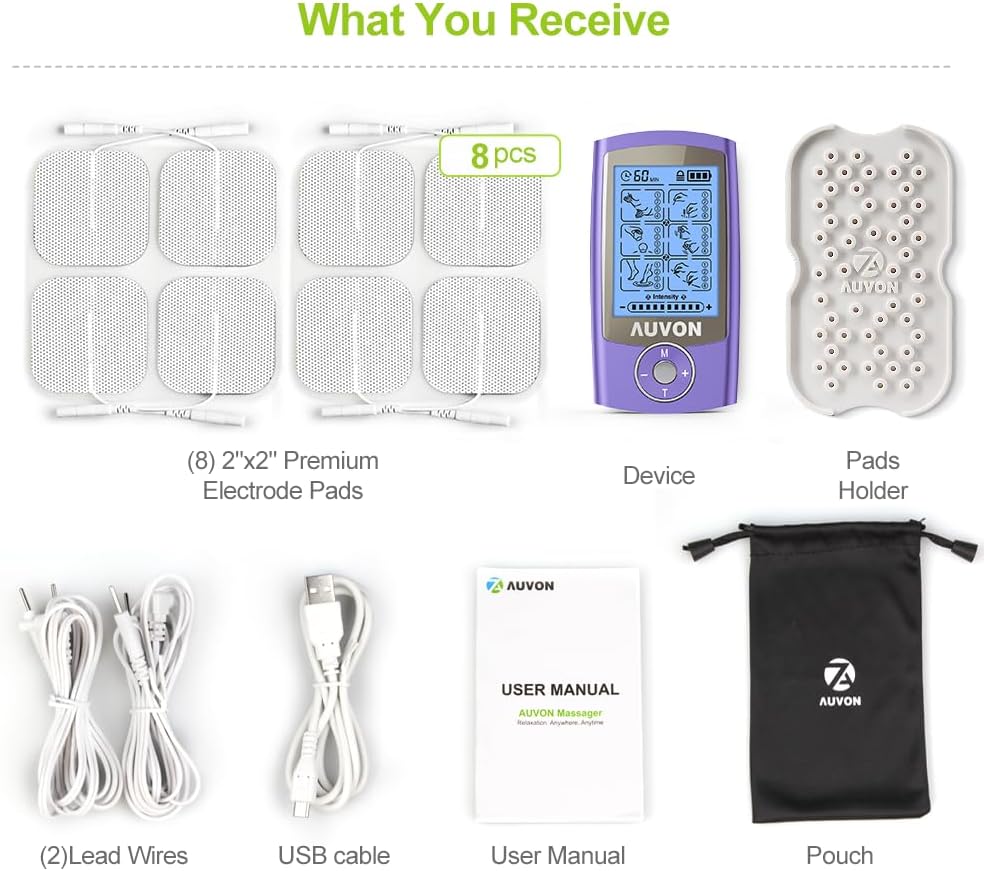
Image: All components included in the AUVON TENS Unit package.
3. Khoom Tshajview
The AUVON Rechargeable TENS Unit Muscle Stimulator is a professional-grade electrotherapy device designed for pain relief and muscle relaxation. It features 24 user-friendly pre-programmed massage modes and adjustable intensity levels.
Cov yam ntxwv tseem ceeb:
- 24 Pre-programmed Hom: Offers a variety of massage techniques for different needs.
- 20 Qib Siab: Allows for precise adjustment of stimulation strength.
- Rechargeable Lithium roj teeb: Muab txog li 10 teev ntawm kev siv tas li ntawm ib zaug xwb.
- Lub zog ntsuas: Keeps you informed about remaining battery life.
- Cov Gel Pads uas tau hloov kho dua tshiab: Low-impedance solid gel for premium self-stick performance and extended lifespan (up to 45 uses).

Duab: Tshajview of the AUVON TENS Unit's features, highlighting its 24 modes and rechargeable battery.
4. Teeb tsa
4.1 Txuas Cov Electrode Pads
- Ensure the TENS unit is turned OFF.
- Connect the lead wires to the electrode pads. Each lead wire typically has two connectors for two pads.
- Carefully remove the protective film from the electrode pads.
- Apply the pads to clean, dry skin on the desired treatment area. Ensure pads are placed at least one inch apart.
- Plug the lead wires into the output ports on the top of the TENS unit. The device has two output ports (A and B) allowing for up to 4 pads to be used simultaneously.
4.2 Kev them nyiaj yug ntaus ntawv
The AUVON TENS Unit is equipped with a rechargeable lithium battery. To charge:
- Turn the unit ON first.
- Connect the provided Type-C USB cable to the charging port on the device.
- Plug the other end of the USB cable into a compatible wall charger (not included) or a USB port.
- The power indicator on the screen will show charging status. A full charge typically takes about 1 hour and provides up to 10 hours of continuous use.

Image: The AUVON TENS Unit being charged via its Type-C USB cable.
5. Cov lus qhia ua haujlwm
The AUVON TENS Unit is designed for ease of use with pre-programmed settings.
5.1 Qhib / Tawm
- To turn ON the device, slide the power switch located on the top of the unit. The screen will illuminate.
- To turn OFF, slide the power switch back to its original position.
5.2 Xaiv hom
- Press the 'M' button (Mode) to cycle through the 6 main massage modes.
- Within each main mode, press the round center button to select one of the 4 sub-modes (totaling 24 sub-modes). The selected mode will blink on the screen.
5.3 Kho Qhov Kub
- Use the '+' button to increase the intensity of the electrical stimulation.
- Use the '-' button to decrease the intensity.
- Adjust the intensity to a comfortable level where you feel a strong but non-painful sensation.
5.4 Teem Lub Timer
- Press the 'T' button (Timer) to adjust the treatment duration. Available times typically range from 10 to 60 minutes.
- The device will automatically shut off once the set time is complete.

Image: Simplified guide to setting up the AUVON TENS Unit's modes, intensity, and timer.
6. Electrode Pad Care
Proper care of your electrode pads ensures optimal performance and longevity.
- The upgraded low-impedance solid gel pads are designed for premium self-stick performance and can be reused up to 45 times with proper care.
- After each use, place the pads back onto the provided pad holder or the plastic film to maintain their adhesive quality.
- Yog tias cov ntaub qhwv poob lawv qhov nplaum, maj mam so qhov chaw nplaum nrog cov tshuaj nplaum.amp cloth or a few drops of water. Allow them to air dry completely before reapplying to the holder.
- Khaws cov ntaub qhwv rau hauv qhov chaw txias thiab qhuav kom deb ntawm tshav ntuj ncaj qha.
- Replacement pads (2mm pigtail TENS Unit pads) are widely available.

Image: Details on the durability and quality of AUVON's upgraded gel pads.
7. Cov neeg siv tau
The AUVON TENS Unit is suitable for a wide range of individuals experiencing muscle soreness, tension, and everyday aches. This includes office workers, individuals who are overworked, homemakers, fitness enthusiasts, and middle-aged or elderly people.

Image: Examples of individuals who may find the AUVON TENS Unit beneficial for pain relief.
8. Cov lus qhia tshwj xeeb
| Qauv nab npawb | TIAB SA 1080 |
| Pob Dimensions | 5.71 x 3.31 x 2.52 po |
| Yam Nyhav | 8.47 hli |
| Roj teeb | 1 Lithium Ion roj teeb (nrog) |
| Chaw tsim tshuaj paus | AUVON |
| Hnub Ua Ntej Muaj | Cuaj hlis 15, 2025 |
9. Warranty thiab Support
AUVON provides a 12-month warranty for the TENS Unit Muscle Stimulator. For any technical support or customer service inquiries, please refer to the contact information provided in your Professional User Manual or visit the AUVON official webqhov chaw.