
Taw qhia
Thank you for choosing the LIORQUE Wireless Weather Station YGH6208. This device provides accurate indoor and outdoor temperature and humidity readings, weather forecasts, and features a DCF radio-controlled clock with alarm functions. This manual will guide you through the setup, operation, and maintenance of your weather station.
Ntim Cov Ntsiab Lus
- 1 x LIORQUE Wireless Weather Station (Main Unit)
- 1 x Sab nraum zoov Sensor
- 3 x AAA Batteries (for Main Unit)
- 2 x AAA Batteries (for Outdoor Sensor)
- 1 x User Manual (cov ntaub ntawv no)
Khoom Tshajview
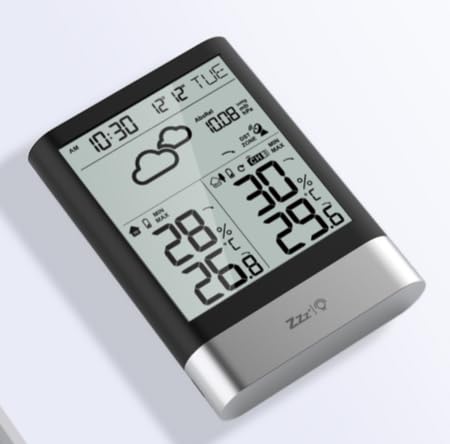
Duab 1: LIORQUE Wireless Weather Station Main Unit. This image shows the front view of the main display unit, highlighting its LCD screen and compact design.
Main Unit Features:
- 4.3-inch LCD screen with backlight
- Sab hauv tsev kub thiab av noo tso saib
- Sab nraum zoov kub thiab humidity zaub
- Huab cua huab cua icons
- DCF radio-controlled clock with manual setting option
- Double alarm clock with snooze function
- Calendar and day of the week display (7 languages)
- Max/Min temperature and humidity records
- Air pressure display and weather trend
- 12/24 teev sij hawm tso saib
Cov yam ntxwv ntawm Sensor sab nraum zoov:
- Wireless transmission up to 100m (open area)
- Kev ntsuas kub thiab av noo
- Supports hanging or standing placement
- Data updated every 30 seconds
- Supports up to 3 sensors (one included)
Teeb tsa
1. Kev teeb tsa roj teeb
- Sab nraum zoov Sensor: Open the battery compartment cover on the back of the outdoor sensor. Insert 2 x AAA batteries, ensuring correct polarity (+/-). Close the cover.
- Main Unit: Open the battery compartment cover on the back of the main unit. Insert 3 x AAA batteries, ensuring correct polarity (+/-). Close the cover.
- The main unit will power on and display indoor readings.
2. Kev Sib Txuas Sensor
After installing batteries in both units, the main unit will automatically search for the outdoor sensor. The outdoor temperature and humidity should appear on the main unit's display within a few minutes. If the outdoor readings do not appear:
- Ensure both units are within range (up to 100m in open air).
- Press the "TX" button inside the outdoor sensor's battery compartment to manually send a signal.
- On the main unit, press and hold the "CHANNEL" button to initiate a manual search for the sensor.
3. Initial Settings (Time, Date, Units)
The weather station will attempt to synchronize with the DCF radio signal for automatic time setting. This may take several hours, especially in areas with weak signals. You can manually set the time and date if needed.
- Manual Time Setting: Press and hold the "MODE" button to enter time setting mode. Use the "UP" and "DOWN" buttons to adjust values and "MODE" to confirm and move to the next setting (e.g., 12/24 hour format, hour, minute, year, month, day, language for day of week).
- Chav ntsuas kub: Press the "°C/°F" button to switch between Celsius and Fahrenheit.
- Air Pressure Units: Press the "BARO" button to cycle through air pressure units (e.g., hPa, inHg).
Cov lus qhia ua haujlwm
Qhia ntaub ntawv
The 4.3-inch LCD screen displays various information:
- Sijhawm thiab Hnub: Lub sijhawm tam sim no, hnub tim, thiab hnub ntawm lub lim tiam.
- Indoor Readings: Tam sim no sab hauv tsev kub thiab av noo.
- Outdoor Readings: Current outdoor temperature and humidity from the connected sensor.
- Huab Cua Huab Cua: Icons indicating predicted weather conditions (e.g., sunny, cloudy, rainy).
- Cua Siab: Current atmospheric pressure and trend.
- Backlight: The screen backlight activates with a light touch and returns to normal brightness after 10 seconds to conserve battery.
Lub tswb moos muaj nuj nqi
The weather station features a double alarm clock with snooze.
- Teeb tsa lub tswb: Press the "ALARM" button to view Alarm 1. Press "ALARM" again to view Alarm 2. Hold "ALARM" to enter alarm setting mode. Use "UP" and "DOWN" to adjust the hour and minute, and "ALARM" to confirm.
- Activating/Deactivating Alarms: Thaum viewing an alarm, press "UP" to toggle it on or off. An alarm icon will appear when active.
- Pw tsaug zog muaj nuj nqi: When an alarm sounds, press any button (except "ALARM OFF") to activate snooze. The alarm will sound again after a set interval. Press "ALARM OFF" to stop the alarm completely.
Cov ntaub ntawv ntau thiab tsawg
The weather station records the maximum and minimum indoor/outdoor temperature and humidity values.
- Press the "MAX/MIN" button once to display maximum recorded values.
- Press "MAX/MIN" again to display minimum recorded values.
- Press "MAX/MIN" a third time to return to current readings.
- To clear records, hold the "MAX/MIN" button while viewntawm cov ntaub ntawv.
Kev tu
- Hloov roj teeb: Replace batteries in both the main unit and outdoor sensor when the low battery indicator appears on the display. Always replace all batteries at the same time.
- Ntxuav: Clean the display and unit surfaces with a soft, damp daim ntaub. Tsis txhob siv cov tshuaj abrasive los yog cov kuab tshuaj.
- Sab nraum zoov Sensor Placement: For optimal performance and longevity, install the outdoor sensor in a shaded area, protected from direct sunlight and rain. Ensure it is within the 100m wireless range of the main unit.
Kev daws teeb meem
| Teeb meem | Kev daws teeb meem |
|---|---|
| No outdoor temperature/humidity display. |
|
| Lub sijhawm tso saib tsis raug. |
|
| Zaub yog dim los yog dawb paug. |
|
| Weather forecast seems inaccurate. |
|
Specifications
- Qauv: hwv 6208
- Hom Tshuaj: LIORQUE
- Hom Zaub: LCD
- Power Source (Main Unit): 3 x AAA roj teeb (nrog)
- Power Source (Outdoor Sensor): 2 x AAA roj teeb (nrog)
- Wireless Range: Txog li 100m (qhib cheeb tsam)
- Kub qhov tseeb: ± 0.5 ° C
- Sensor Technology: Funk (Wireless)
- Tshwj xeeb nta: DCF Radio Clock, Alarm, Snooze, Weather Forecast, Max/Min Records, Backlight
- Cov Cheebtsam suav nrog: Weather Station Main Unit, Outdoor Sensor
Warranty thiab Support
LIORQUE products are designed for reliability and performance. For warranty information or technical support, please refer to the contact details provided with your purchase or visit the official LIORQUE webqhov chaw. Thov khaws koj cov ntaub ntawv pov thawj ntawm kev yuav khoom rau kev lees paub.