
ROCAM CR1030DAB
ROCAM CR1030DAB Solar DAB+/FM Emergency Radio User Manual
Model: CR1030DAB
Taw qhia
Ua tsaug rau kev yuav khoomasing the ROCAM CR1030DAB Solar DAB+/FM Emergency Radio. This portable radio is designed for reliable communication and power in various situations, from daily use to outdoor adventures and emergencies. It features DAB+/FM radio reception, Bluetooth connectivity, multiple charging options including solar and hand crank, a powerful 12000 mAh battery, and integrated lighting functions. Please read this manual thoroughly before use to ensure proper operation and to maximize the product's lifespan.
Cov lus qhia kev nyab xeeb
- Do not expose the device to extreme temperatures, direct sunlight for prolonged periods (beyond charging), or high humidity.
- Tsis txhob poob lossis ua rau lub xov tooj cua raug kev cuam tshuam loj heev.
- Tsis txhob disassemble los yog sim kho lub tsev koj tus kheej. Xa tag nrho cov kev pabcuam rau cov neeg ua haujlwm tsim nyog.
- Keep the device away from water and other liquids, except for its IPX6 water resistance which protects against strong jets of water. Do not submerge.
- Ensure the USB-C port cover is securely closed when not in use, especially in wet conditions.
- When using the hand crank, turn it at a steady, moderate pace. Excessive force or speed can damage the mechanism.
- The SOS alarm is very loud. Avoid activating it unnecessarily or near sensitive ears.
- Pov tseg cov roj teeb raws li cov cai hauv zos.
Ntim Cov Ntsiab Lus
Xyuas kom tseeb tias txhua yam khoom muaj nyob hauv pob:
- 1 × ROCAM CR1030DAB Radio
- 1 × USB-C Charging Cable
- 1 × Portable Strap
- 1 × Tus neeg siv phau ntawv
Khoom Tshajview
Familiarize yourself with the radio's components and controls.

Duab: Pem hauv ntej view of the ROCAM CR1030DAB radio, highlighting its display, control buttons, and extended antenna. The radio is shown in an outdoor setting, emphasizing its portable and robust design.
Cov ntsiab lus tseem ceeb:
- 2.4-nti Xim Zaub: Shows station information, battery level, time, and menu options.
- Tswj khawm: Power, Mode, Menu, Scan, Volume, Navigation (Up/Down/Left/Right/OK), SOS.
- Telescopic Kav hlau txais xov: For optimal DAB+/FM signal reception.
- Hnub Ci Vaj Huam Sib Luag: Located on top for solar charging.
- Tes Crank: On the side for manual power generation.
- Lub teeb: Integrated LED light on one end.
- Nyeem Lamp: Foldable panel with 12 LEDs.
- USB-C Input / Output Chaw nres nkoj: For charging the radio and charging external devices.
- Lub mloog pob ntseg Jack (3.5mm): Rau tus kheej mloog.
- Roj teeb lub thawv: For AAA backup batteries.

Duab: Cov ncauj lus kom ntxaws view of the radio's 2.4-inch color display, illustrating its clarity and the information presented, such as station name and signal strength.
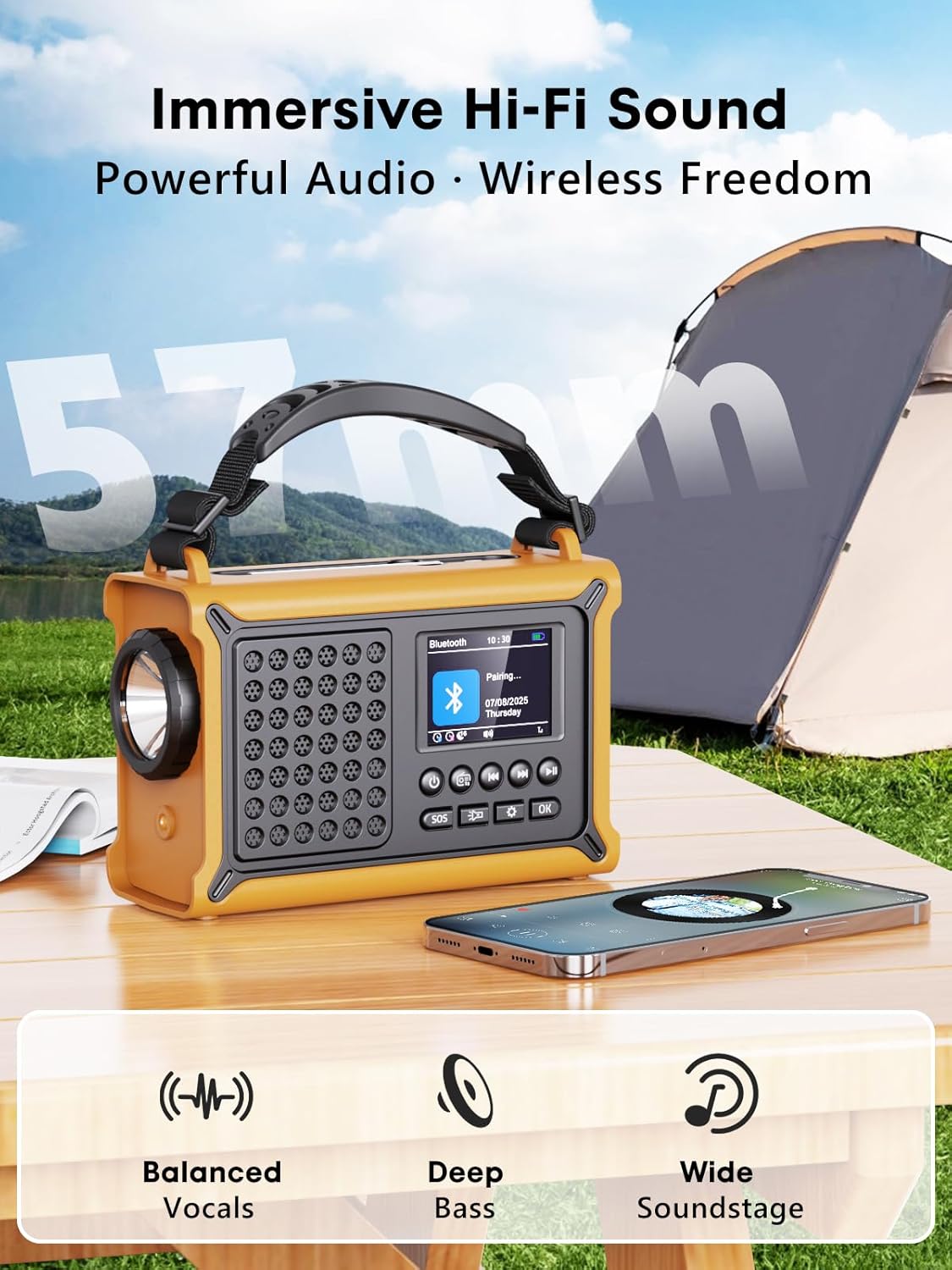
Duab: The radio highlighting its audio capabilities, featuring 57mm speakers designed for clear, powerful sound with balanced vocals and deep bass.

Duab: The radio held in hand, illustrating its ultra-portable design and compact dimensions (17.3 cm length, 12.1 cm height, 7.4 cm width), along with its IPX6 water resistance.
Teeb tsa
1. Kev them nqi pib
Before first use, it is recommended to fully charge the radio's internal 12000 mAh battery using the supplied USB-C cable. Connect the USB-C cable to the radio's USB-C input port and the other end to a standard USB power adapter (not included) or a computer USB port. The charging indicator on the display will show the charging status. A full charge ensures maximum battery life and optimal performance.
2. Inserting AAA Batteries (Optional Backup)
For an additional power backup, you can insert 3 AAA batteries (not included) into the battery compartment. This provides an alternative power source if the internal rechargeable battery is depleted and other charging methods are unavailable.
3. Power On and Language Selection
Nias thiab tuav lub Hwj chim button to turn on the radio. Upon first power-on, you may be prompted to select your preferred language from the 12 available options. Use the navigation buttons to select and the OK khawm kom paub meej.
Cov lus qhia ua haujlwm
Lub hwj chim On / Off
- Txhawm rau qhib: Nias thiab tuav lub Hwj chim khawm.
- Txhawm rau tua: Nias thiab tuav lub Hwj chim khawm dua.
DAB+/FM Radio Operation
- Xaiv hom: Nias lub Hom button to switch between DAB+ and FM radio modes.
- Txuas Antenna: Fully extend the telescopic antenna for best reception.
- Pib Pib: In DAB+ or FM mode, press the Luam theej duab button to automatically search for available stations. The radio will store up to 40 DAB+ and 40 FM stations.
- Manual Tuning/Station Selection: Siv cov Up/down navigation buttons to browse through scanned stations or manually tune frequencies.
- Volume Control: Siv cov Ntim +/- cov nyees khawm los kho qib suab.
- Presets: To save a station, tune to the desired station, then press and hold the OK button. Use navigation buttons to select a preset number and press OK to save. To recall a preset, briefly press the OK button, then use navigation to select the preset.
Kev sib txuas Bluetooth
- Nkag mus rau Bluetooth hom: Nias lub Hom button until "Bluetooth" appears on the display. The radio will enter pairing mode, indicated by a blinking Bluetooth icon.
- Pairing: On your smartphone or other Bluetooth device, enable Bluetooth and search for available devices. Select "ROCAM CR1030DAB" from the list.
- Txuas: Once paired, the radio will emit a confirmation sound, and the Bluetooth icon will stop blinking. You can now play audio from your device through the radio.
Them xov tooj cua
The radio offers multiple charging methods for its internal 12000 mAh battery:

Duab: The radio demonstrating its versatile charging capabilities, including the solar panel, USB-C input, hand crank, and the option for AAA batteries.
- Kev them nyiaj yug USB-C: Connect the supplied USB-C cable to a 5V/2A (or higher) USB power source. This is the fastest charging method.
- Kev them nyiaj hnub ci: Place the radio with the solar panel facing direct sunlight. The solar charging indicator will illuminate. This method is ideal for maintaining charge or slow charging in emergencies. The 8500 mm² panel provides 350 mA.
- Tes Crank Charger: Rotate the hand crank clockwise or counter-clockwise at a steady pace (approx. 120-150 RPM). Cranking for 1 minute can provide several minutes of radio playback. The hand crank generates 650 mA.
- AAA roj teeb: If the internal battery is depleted, the radio can operate using 3 AAA batteries (not included) inserted into the battery compartment.
External Device Charging (Power Bank Function)
The radio can act as a power bank to charge external devices like smartphones. Connect your device's charging cable to the radio's USB-C output port. The radio's 12000 mAh battery provides a 5V/1A output.
Teeb pom kev zoo

Duab: A composite image illustrating the radio's versatile lighting options: a powerful 5W flashlight, the SOS red flashing light, and a soft 12-LED reading lamp.
- Lub teeb: Nias lub Teeb nyem button once to turn on the 5W LED flashlight. Press again to cycle through brightness levels (if available) or turn off.
- Nyeem Lamp: Lift the reading lamp panel. Press the Nyeem Lamp button (often combined with flashlight button or a separate one) to activate the 12-LED reading lamp. Press again to cycle through brightness levels or turn off.
SOS Alarm Function
In an emergency, press and hold the SOS button. The radio will emit a loud 120 dB siren and flash a red light to attract attention. Press the SOS button again to deactivate the alarm.
Kev tu
- Ntxuav: So lub xov tooj cua nrog mos, damp daim ntaub. Tsis txhob siv cov tshuaj abrasive los yog cov kuab tshuaj.
- Cia: When not in use for extended periods, store the radio in a cool, dry place. It is recommended to fully charge the internal battery every 3-6 months to maintain its health.
- Kev kho roj teeb: Avoid completely draining the internal battery frequently. Recharge it as soon as possible when the low battery indicator appears.
Kev daws teeb meem
| Teeb meem | Ua Tau | Kev daws |
|---|---|---|
| Xov tooj cua tsis qhib. | Roj teeb yog depleted. | Charge the radio via USB-C, solar, or hand crank. Ensure AAA batteries are inserted correctly if using them. |
| Kev txais xov tooj cua tsis zoo. | Antenna not extended, weak signal area, interference. | Fully extend the telescopic antenna. Reposition the radio to a location with better signal. Perform an auto scan again. |
| Bluetooth ntaus ntawv txuas tsis tau. | Radio not in pairing mode, device too far, already connected to another device. | Ensure the radio is in Bluetooth pairing mode. Move the device closer to the radio. Disconnect from other Bluetooth devices. |
| Cov khoom siv sab nraud tsis them. | Radio battery too low, incorrect cable, device not compatible. | Ensure the radio has sufficient charge. Use a compatible USB-C cable. Some devices may draw too much power. |
| Hand crank is stiff or not charging. | Mechanism obstruction, incorrect cranking speed. | Check for any obstructions. Rotate the crank at a steady, moderate pace. Do not force it. |
Specifications
| Qauv | CR1030DAB |
| Xov tooj cua Bands | DAB+, FM |
| Bluetooth Version | 5.0 |
| Roj teeb muaj peev xwm | 12000 mAh (Lithium) |
| Kev Them Nqi | USB-C, Solar, Hand Crank, 3x AAA Batteries (backup) |
| Hnub Ci Vaj Huam Sib Luag Loj | 8500 mm² (350 mA output) |
| Hand Crank Output | 650 mA |
| USB tso zis | 5V / 1A |
| Zaub | 2.4-nti Xim LCD |
| Presets | 80 (40 DAB+, 40 FM) |
| Dej tsis kam | IPX6 |
| SOS tswb | 120dB ua |
| Teeb nyem | 5W LED teeb |
| Nyeem Lamp | 12-LED |
| Qhov ntev | 12L x 17.2W x 7.3H cm (kwv yees li) |
| Qhov hnyav | 820 grams (kwv yees) |

Duab: A comparison chart detailing the specifications of the ROCAM CR1030DAB against generic alternatives, emphasizing its advanced features like a larger color display, higher battery capacity, and more efficient charging.
Warranty thiab Support
ROCAM products are designed for reliability and performance. This product comes with a standard manufacturer's warranty. For specific warranty details, please refer to the documentation provided with your purchase or contact ROCAM customer support.
If you encounter any issues or have questions regarding the operation or maintenance of your ROCAM CR1030DAB radio, please contact our customer support team.
- Kev Pab Txhawb Cov Neeg Siv Khoom: Refer to your product packaging or the ROCAM official website rau cov ntaub ntawv tiv tauj.
- Cov ntaub ntawv online: Visit the ROCAM website rau FAQs, npe khoom, thiab cov ntaub ntawv txhawb ntxiv.
Ask a question about this manual
Ask about setup, troubleshooting, compatibility, parts, safety, or missing instructions. Manuals+ will review the question and use this page’s manual context to help answer it.