Taw qhia
This manual provides detailed instructions for the installation, operation, and maintenance of your darkFlash DB330M Micro-ATX PC Case. Please read this manual thoroughly before beginning assembly to ensure proper setup and safe usage. The DB330M case features a 270° panoramic tempered glass panel, pre-installed PWM ARGB fans, and a high-speed I/O panel.
Cov ntaub ntawv kev nyab xeeb
- Ua ntej koj yuav txhim kho lossis kho cov khoom hauv lub PC, koj yuav tsum tshem lub hwj chim tawm ntawm lub qhov hluav taws xob.
- Handle tempered glass panels with care to prevent breakage. Avoid impacts or sharp objects.
- Wear anti-static gloves or use an anti-static wrist strap to prevent electrostatic discharge (ESD) damage to sensitive components.
- Khaws cov khoom me me thiab cov ntsia hlau kom deb ntawm cov menyuam yaus.
- Xyuas kom muaj cua nkag tau zoo nyob ib puag ncig lub PC kom tiv thaiv kev kub dhau.
Ntim Cov Ntsiab Lus
Xyuas kom tseeb tias txhua yam khoom muaj nyob hauv pob:
- darkFlash DB330M Micro-ATX PC Case
- 3 x Pre-installed PWM ARGB Fans
- Accessory Box (screws, cable ties, etc.)
- Tus Neeg Siv Los Siv (cov ntawv no)
Nta Tshajview
- 270° Panoramic Tempered Glass: Provides an expansive view ntawm cov khoom sab hauv thiab RGB teeb pom kev zoo.
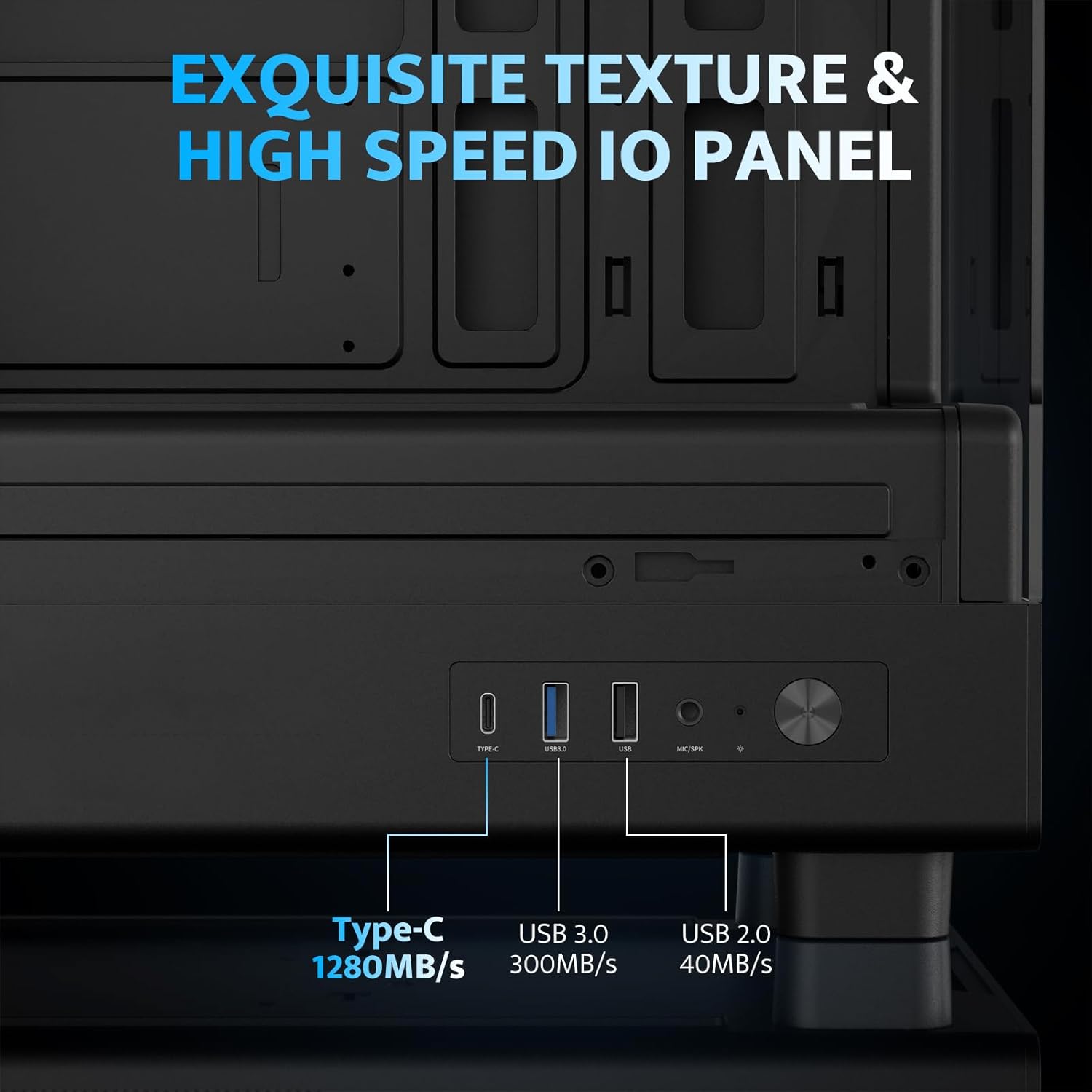
- High-Speed I/O Panel: Includes USB 3.0 and Type-C ports for fast data transfer.
- Vertical Airflow Cooling: Optimized design with pre-installed fans for efficient heat dissipation.
- Magnetic Dust Filters: Located on top and bottom to keep components clean.
- Ib qho yooj yim installation: User-friendly design for hassle-free assembly and maintenance.
Specifications
| Feature | Specification |
|---|---|
| Qauv Lub Npe | DB330M PC CASE |
| Qhov Loj (LxWxH) | 8.58 "D x 13.11" W x 15.75" H (218mm x 333mm x 400mm) |
| Compatibility ntawm motherboard | Micro ATX, ITX |
| Case Hom | Midi Ntauwd |
| Khoom siv | Yas, Iav Tempered |
| Pre-installed Ntxuam | 3 x 120mm PWM ARGB Fans |
| Max CPU Cooler Qhov siab | 180 hli |
| Max GPU Clearance | 305 hli |
| Kev Txhawb Nqa Radiator (Sab Saum Toj) | Txog li 240mm |
| Fais Fab Mounting Hom | Bottom Mount (Max 140mm PSU length) |
| I/O Ports | 1 x USB 3.0, 1 x Type-C, Audio In/Out |
Kev teeb tsa thiab kev teeb tsa
1. Accessing the Interior (Quick Release Design)
The darkFlash DB330M features a quick-release design for easy access to internal components. The tempered glass panels can be removed by gently pulling them away from the chassis. The top panel also detaches for fan/radiator installation.

2. Kev teeb tsa motherboard
Install your Micro-ATX or ITX motherboard into the designated area. Ensure standoffs are correctly aligned and secured. The case supports CPU coolers up to 180mm in height and GPUs up to 305mm in length.

3. Fan and Cooling System Installation
The case comes with three pre-installed 120mm PWM ARGB fans. Two fans are located at the top, and one at the rear. Additional fan mounts are available at the bottom (up to 2 x 120mm) for enhanced airflow. The case supports a 240mm AIO radiator on the top panel.
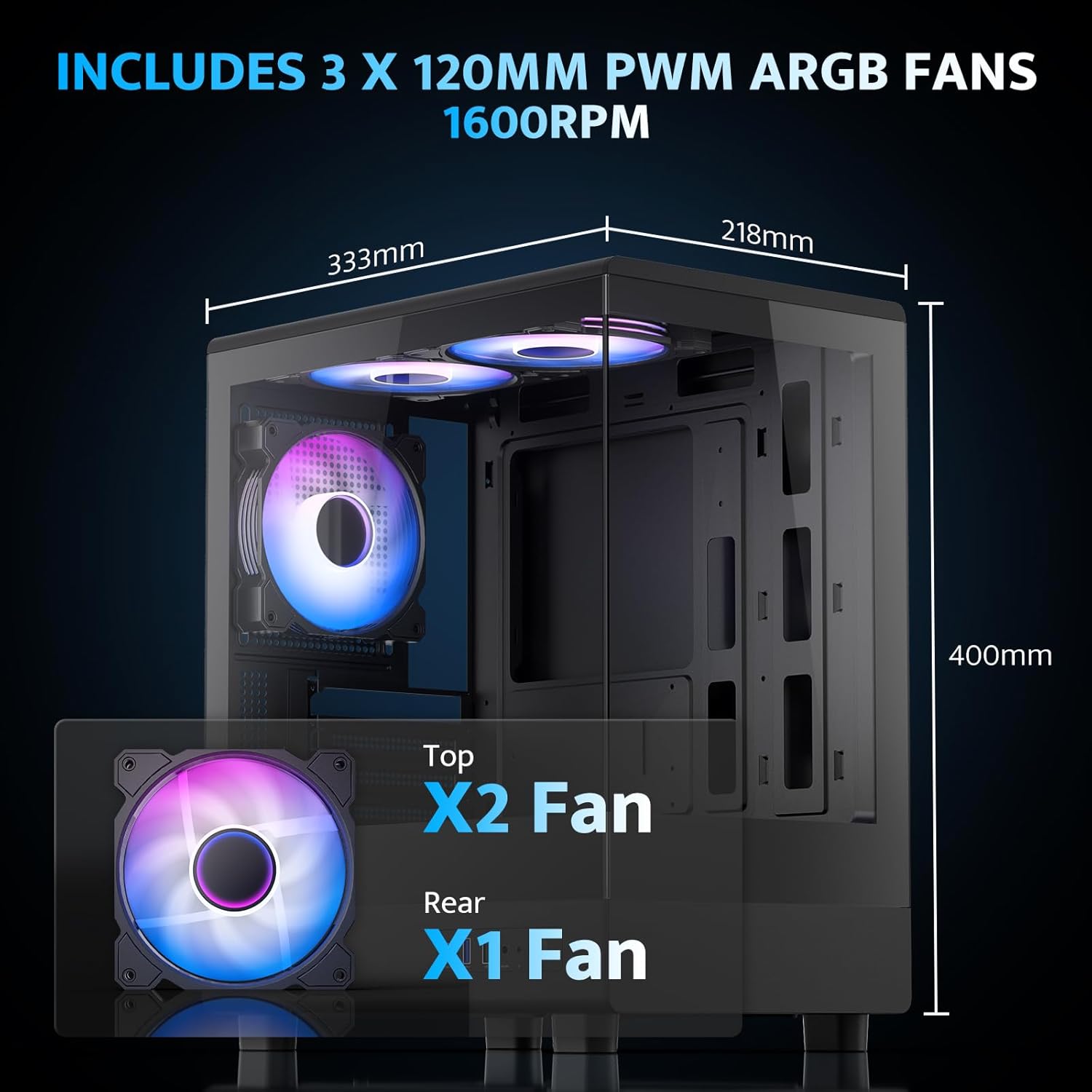
The pre-installed fans are PWM ARGB type, offering speed adjustment and rich lighting modes with motherboard synchronization. Note: An RGB hub controller is not included.

4. Power Supply and Storage Installation
Install your power supply unit (PSU) in the bottom mount. The case supports PSUs up to 140mm in length. Utilize the standard hard drive cage for storage devices.
5. Connecting Front I/O Panel
Connect the front I/O panel cables to your motherboard. The panel includes a Type-C port, USB 3.0 port, and USB 2.0 port for various connectivity needs.
6. Kev Tswj Xyuas Cable
Utilize the cable routing options and tie-downs behind the motherboard tray to ensure clean cable management. This improves airflow and aesthetics.
Cov lus qhia ua haujlwm
1. Fais fab rau
After all components are securely installed and connected, plug in the power cable to your PSU and press the power button on the front I/O panel to start your system.
2. Kev Tswj Cua ARGB
The pre-installed ARGB fans can be controlled via compatible motherboard software (if connected to an ARGB header) to customize lighting effects and fan speeds. Refer to your motherboard manual for specific software instructions.
3. Airflow Configuration
The DB330M is designed with optimized airflow channels. The pre-installed fans facilitate vertical airflow, with the fan above the PSU directing air towards the graphics card. Ensure no obstructions block the airflow paths.


Kev tu
1. Kev Ntxuav Lim Plua Plav
Regularly clean the magnetic dust filters located on the top and bottom of the case. Gently remove the filters and clean them with compressed air or a soft brush. Reattach them securely after cleaning.
2. Kev tu vaj tse
Use a soft, dry cloth to wipe down the exterior of the case. For tempered glass panels, use a glass cleaner and a microfiber cloth. Avoid abrasive cleaners or solvents.
Kev daws teeb meem
- PC Tsis Muaj Hwj Chim:
- Ensure the power supply is properly connected to the wall and the PSU switch is in the 'ON' position.
- Verify all power cables from the PSU are securely connected to the motherboard and components.
- Tshawb xyuas qhov kev sib txuas ntawm lub hwj chim ntawm lub vaj huam sib luag pem hauv ntej rau lub motherboard.
- Cov kiv cua tsis tig / RGB tsis ua haujlwm:
- Confirm fan power cables are connected to the motherboard or fan controller.
- Ensure ARGB cables are connected to a compatible ARGB header on the motherboard or an ARGB controller.
- Tshawb xyuas cov chaw teeb tsa software ntawm motherboard rau qhov ceev ntawm kiv cua thiab RGB tswj.
- Cov Chaw Nres USB Tsis Ua Haujlwm:
- Verify the front panel USB 3.0 and Type-C cables are correctly plugged into the corresponding headers on your motherboard.
- Ensure motherboard drivers are up to date.
Warranty thiab Support
darkFlash provides a Kev lees paub 1 xyoos for this computer case. For technical support, warranty claims, or further assistance, please contact darkFlash customer service through their official webqhov chaw lossis lub khw muag khoom uas cov khoom tau yuav. Thov khaws koj cov ntaub ntawv pov thawj ntawm kev yuav khoom rau kev lav validation.
Official darkFlash Webqhov chaw: www.darkflash.com


