


ozobot Bit + Coding neeg hlau

Txuas
- Txuas Bit + rau lub laptop siv lub USB them cable.
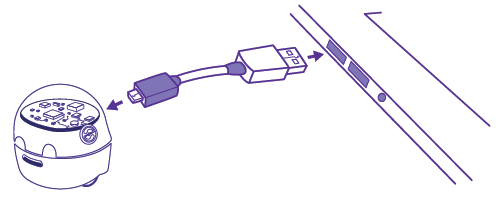
- Mus rau ib ozo.bot/blockly thiab nyem "Get Started".
- Tshawb xyuas firmware hloov tshiab & installation.
Thov nco ntsoov:
Cov khoom siv hauv chav kawm xav kom cov bots txuas rau tus kheej thiab tsis tuaj yeem hloov kho thaum nyob hauv lub txaj.
Them nqi
Them siv lub USB cable thaum Bit+ pib ntsais RED. 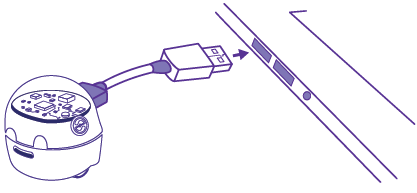
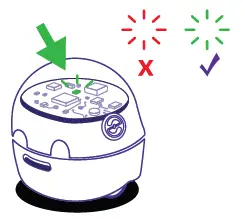
Thaum them nyiaj, Bit + blinks RED / GREEN ntawm tus nqi qis, blinks GREEN ntawm kev npaj them nqi, thiab hloov SOLID GREEN ntawm tus nqi tag nrho.
Yog tias nruab nrog lub txaj them, siv lub hwj huam sib txuas los ntsaws thiab them nqi Bit + bots.

Bit + yog sib xws nrog Arduino®. Yog xav paub ntxiv, thov mus saib ib ozobot.com/arduino.
Calibrate
Ib txwm calibrate Bit + ua ntej txhua qhov kev siv lossis tom qab hloov qhov chaw kawm.
Thov nco ntsoov:
Xyuas kom tseeb tias lub roj teeb Cutoff Hloov yog teem rau On txoj hauj lwm.
- Xyuas kom tseeb tias Bit + yog powered, ces teem lub bot nyob rau hauv nruab nrab ntawm ib tug dub lub voj voog (txog qhov loj ntawm tus neeg hlau lub hauv paus). Koj tuaj yeem tsim koj tus kheej lub voj voog dub siv cov cim.
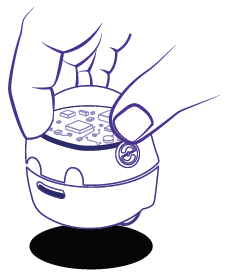
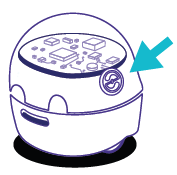
- Tuav lub Go khawm ntawm Bit + rau 2 sec. mus txog thaum lub teeb ntsais dawb. Tom qab ntawd, tso lub pob Go thiab txhua qhov kev sib cuag nrog bot.
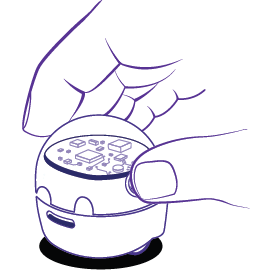
- Bit + yuav txav thiab ntsais ntsuab. Qhov ntawd txhais tau tias nws yog calibrated! Yog tias Bit + blinks liab, pib dua los ntawm kauj ruam 1.
- Nias lub Go khawm kom tig Bit + rov qab rau.
Yog xav paub ntxiv, mus saib ozobot.com/support/calibration.
Kawm
 Xim Codes
Bit + tuaj yeem tsim kho siv Ozobot's Color Code lus. Thaum Bit + nyeem ib qho xim Code, zoo li Turbo, nws yuav ua raws li cov lus txib.
Yog xav paub ntxiv txog Xim Codes, mus saib ozobot.com/create/color-codes.
 Ozobot Blackly
Ozobot Blackly cia koj tswj hwm koj qhov Bit + thaum kawm cov ntsiab lus tseem ceeb ntawm kev ua haujlwm-los ntawm theem pib mus rau qib siab. Yog xav paub ntxiv txog Ozobot Blackly, mus saib ntawm ozobot.com/create/ozoblockly.
 Ozobot Chav Kawm
Ozobot Chav Kawm muaj ntau yam kev qhia thiab kev ua ub no rau Bit +. Yog xav paub ntxiv, mus saib: classroom.ozobot.com.
CARE cov lus qhia
Bit + yog lub hnab tshos me me neeg hlau ntim nrog tech. Kev siv nws nrog kev saib xyuas yuav ua kom zoo thiab ua haujlwm ntev.
Calibration Sensor
Rau kev ua haujlwm zoo, sensors yuav tsum tau ntsuas ua ntej txhua qhov kev siv lossis tom qab hloov qhov chaw ua si lossis teeb pom kev zoo. Yog xav paub ntxiv txog Bit+ cov txheej txheem calibration yooj yim, thov mus saib nplooj ntawv Calibration.
Cov kab mob sib kis thiab ua kua
Lub optical sensing module nyob rau hauv qab ntawm lub cuab yeej yuav tsum nyob twj ywm tsis muaj plua plav, av, zaub mov, thiab lwm yam kab mob. Thov xyuas kom meej tias lub qhov rais sensor yog huv si thiab tsis muaj kev cuam tshuam los tswj Bit + txoj haujlwm kom raug. Tiv thaiv Bit + los ntawm kev raug cov kua dej raws li qhov yuav ua rau nws cov khoom siv hluav taws xob thiab kho qhov muag puas tas mus li.
Ntxuav Lub Log
Kev tsim cov roj ntawm lub tsheb ciav hlau lub log thiab cov ncej tuaj yeem tshwm sim tom qab siv li qub. Txhawm rau kom muaj kev ua haujlwm zoo thiab kev ua haujlwm nrawm, nws raug nquahu kom ntxuav lub tsheb ciav hlau ib ntus los ntawm maj mam dov cov neeg hlau lub log ob peb zaug tawm tsam ib daim ntawv dawb huv lossis daim ntaub tsis muaj lint.
Thov siv txoj kev ntxuav no kuj yog tias koj pom qhov hloov pauv pom hauv Bit + tus cwj pwm txav los yog lwm yam cim ntawm kev txo qis torque.
Txhob Disassemble
Ib qho kev sim kom disassemble Bit + thiab nws cov modules sab hauv yuav ua rau muaj kev puas tsuaj rau lub cuab yeej thiab yuav ua rau tsis muaj kev lav phib xaub, implied lossis lwm yam.
Thov khaws qhov no rau yav tom ntej REFEREENCE.
Tsawg Warranty
Ozobot txwv cov ntaub ntawv pov thawj muaj nyob hauv online: www.ozobot.com/legal/warranty.
Lub roj teeb ceeb toom
Txhawm rau txo qhov kev pheej hmoo ntawm hluav taws kub los yog kub hnyiab, tsis txhob sim qhib, disassemble, lossis pab lub pob roj teeb. Tsis txhob nplawm, xuas nrig ntaus, sib tiv tauj luv luv, nthuav tawm qhov kub siab tshaj 60 ° C (140 ° Fl, lossis pov tseg hauv hluav taws lossis dej.
Lub roj teeb chargers siv nrog lub cuab yeej yuav tsum tau tshuaj xyuas tsis tu ncua rau kev puas tsuaj rau cov hlua, ntsaws, lub kaw lus, thiab lwm yam, thiab thaum muaj kev puas tsuaj, lawv yuav tsum tsis txhob siv kom txog thaum kev puas tsuaj raug kho. Roj teeb yog 3.7V, 70mAH (3.7″ 0.07 = 0.2S9Wl. max khiav hauj lwm tam sim no yog 150mA.
FCC COMPLIANCE STATEMENT
Cov cuab yeej no ua raws li Tshooj 15 ntawm FCC Cov Cai. Kev ua haujlwm yog ua raws li ob yam hauv qab no:
- Cov cuab yeej no yuav tsis ua teeb meem cuam tshuam, thiab
- Cov cuab yeej no yuav tsum lees txais ib qho kev cuam tshuam tau txais, suav nrog kev cuam tshuam uas yuav ua rau kev ua haujlwm tsis xav tau.
CEEB TOOM:
Cov cuab yeej no tau raug sim thiab pom tias ua raws li cov kev txwv rau Class B cov cuab yeej digital, ua raws li Tshooj 15 ntawm FCC Cov Cai. Cov kev txwv no yog tsim los muab kev tiv thaiv tsim nyog tiv thaiv kev cuam tshuam tsis zoo hauv kev teeb tsa hauv tsev. Cov cuab yeej no tsim, siv, thiab tuaj yeem tawg lub zog ntawm xov tooj cua, thiab, yog tias tsis tau nruab thiab siv raws li cov lus qhia, yuav ua rau muaj teeb meem cuam tshuam rau kev sib txuas lus hauv xov tooj cua. Txawm li cas los xij, tsis muaj kev lees paub tias kev cuam tshuam yuav tsis tshwm sim hauv ib qho kev teeb tsa tshwj xeeb. Yog tias cov cuab yeej no ua rau muaj kev cuam tshuam tsis zoo rau lub xov tooj cua lossis TV txais tos, uas tuaj yeem txiav txim siab los ntawm kev tig cov khoom siv thiab qhib, tus neeg siv tau raug txhawb kom sim kho qhov cuam tshuam los ntawm ib lossis ntau qhov kev ntsuas hauv qab no:
- Reorient los yog tshem tawm cov kav hlau txais xov.
- Ua kom muaj kev sib cais ntawm cov khoom siv thiab lub receiver.
- Nrog rau tus neeg muag khoom lossis tus kws tshaj lij xov tooj cua / TV rau kev pab.
CEEB TOOM:
Kev hloov lossis hloov kho rau chav tsev no uas tsis tau pom zoo los ntawm pawg neeg saib xyuas kev ua raws cai tuaj yeem ua rau tus neeg siv txoj cai ua haujlwm ntawm cov khoom siv.
Hnub nyoog 6+
CAN ICES-3 (Bl / NMB-3 (Bl
Cov khoom thiab xim yuav txawv.
Cov ntaub ntawv / Cov ntaub ntawv
 | Bit+ Coding Robot |
Cov ntaub ntawv
- Cov neeg siv phau ntawvmanual.tools