

Yuav ua li cas rau configure Basic Setting ntawm ADSL Modem Router?
Nws yog haum rau: ND150, NPE 300
KAUJ RUAM-1:
Txuas koj lub computer mus rau lub router los ntawm cable, nkag mus rau http://192.168.1.1.

KAUJ RUAM-2:
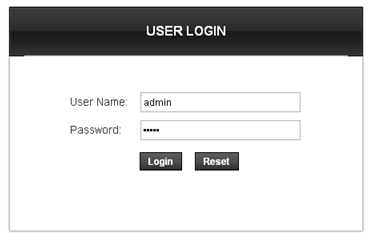
Tus neeg siv lub npe thiab tus password yuav tsum tau, los ntawm lub neej ntawd ob leeg yog admin hauv tsab ntawv me. Nyem Nkag mus.
KAUJ RUAM-3:
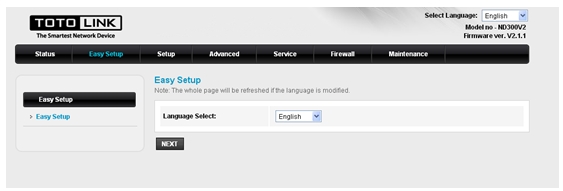
Ua ntej, lub Kev teeb tsa yooj yim nplooj ntawv yuav tig mus rau qhov yooj yim thiab ceev chaw, xaiv ib hom lus, nyem Tom ntej no.
KAUJ RUAM-4:
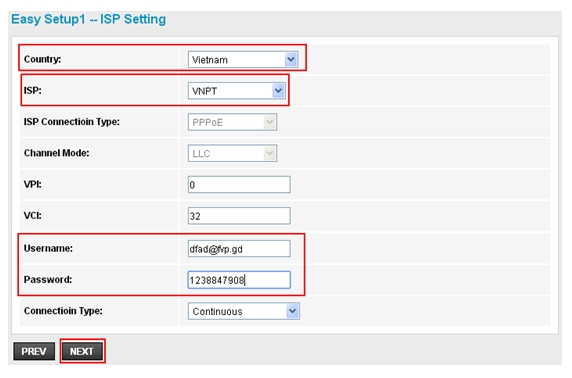
Xaiv koj lub teb chaws thiab ISP koj koom tes, nkag mus Cov neeg siv Lub npe, Password muab los ntawm koj ISP, nyem Tom ntej no.
KAUJ RUAM-5:
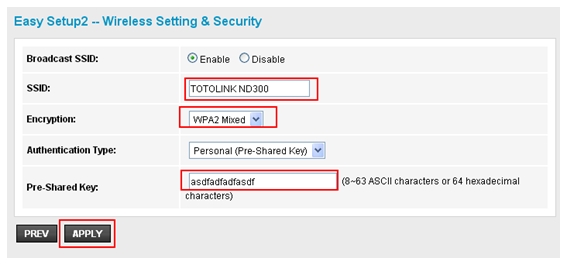
Los ntawm lub neej ntawd, SSID yog TOTOLINK ND300, koj tuaj yeem hloov nws raws li koj nyiam. Ces xaiv WPA2 Mixed (pom zoo) rau Encryption. Sau tus password, nyem THOV ua kom txhua qhov chaw ua haujlwm.
DOWNLOAD
Yuav ua li cas rau configure Basic Setting ntawm ADSL Modem Router - [Download PDF]


